
















You've probably run into this too
\ \Your PC gets slower over time — boot takes minutes, then you wait ages before you can work. Want to clean junk but fear deleting something that breaks the system. Or a sudden error appears and you don't know why or how to investigate. Sometimes you just want to check CPU temperature or drive speed, yet must open different tools one by one. If one app handled all these, it'd be so much easier.
\ \What exactly is this software for?
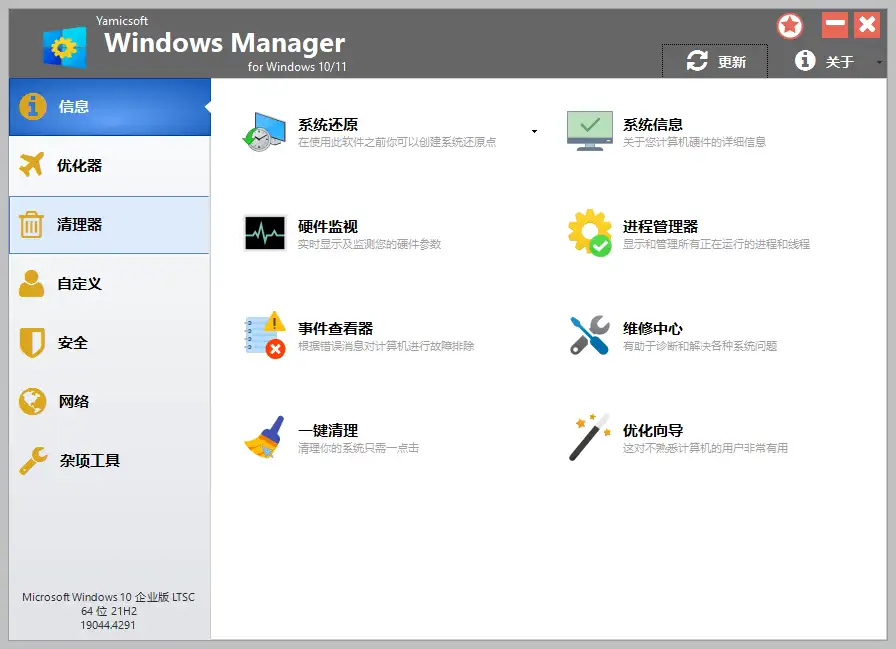
\ \Windows Manager is like an 'all-in-one PC butler' — it brings together system optimization, hardware monitoring, repair and junk cleanup that usually need multiple tools. No more switching between several apps; one tool handles most system maintenance. And it needs no install — put it on a USB drive and use it anywhere.
\ \youtakeitcandowhat?thishow manyfeatureverysoliduse
\ \① givecomputercome1times”big扫remove”
\ \It fully scans the system for junk, temp files, duplicates and invalid registry entries, letting you clear these slow-downs in one click. It also has disk analysis, so you intuitively see which folders take space and target cleanup. Once space is freed, the PC naturally runs faster.
\ \② dostableopenmachineslowandsystemreportedwrong
\ \Startup management shows at a glance which programs auto-run at boot; turning off the unnecessary ones noticeably speeds up startup. When the system fails, use the error-message viewer to find the cause, then try one-click repair. It also supports system restore, so you can roll back after a mistake.
\ \③ Real-time hardware monitoring
\ \It shows detailed specs for CPU, memory, drives and GPU, and monitors temperature, voltage and fan speeds in real time. If temps or fan speeds look off, you troubleshoot early, preventing heat damage.
\ \Who will find it easiest to use?
\ \If your PC feels slower after long use but you're not sure why; or you want a full system check, cleanup and optimization without installing a bunch of tools — Windows Manager fits. It's especially suited to technicians maintaining multiple PCs, or ordinary users who want a well-running PC without too much hassle.
\ \A quick summary
\ \\ \ \ \ \ \Windows Manager brings system optimization, hardware monitoring and repair into one tool, saving the hassle of switching apps. If you often maintain your PC, or just want to keep the system in good shape, it's a handy tool.










