
















You've probably run into this too
\ \Your Steam library has classic old games; you want to lie on the couch with a controller, but the game doesn't recognize it. Or you prefer a controller, open an app that only works with keyboard and mouse, and your hands feel wrong on the keys. Or the game requires mashing the same combo repeatedly until your fingers ache — if only it were one button. Familiar problems?
\ \What can it actually do for you?
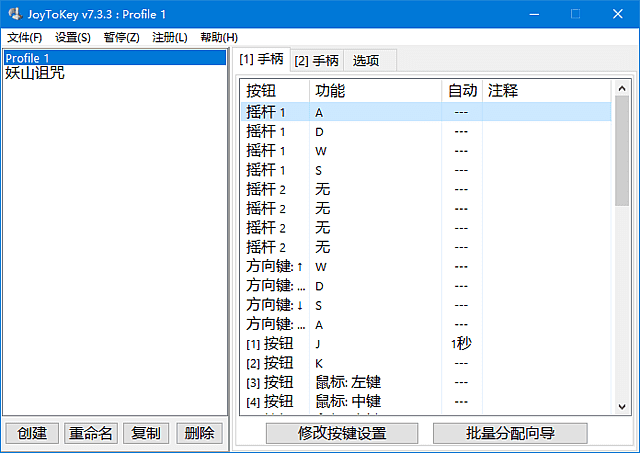
\ \Think of JoyToKey as a 'translator' that converts each controller button's 'language' into keyboard commands and mouse actions the PC understands. Press the A button and it simulates the Space key; push the stick and it simulates mouse movement. This way, any software or game that doesn't support controllers can be operated with one.
\ \thishow manyusemethod,peacefultimeverysoliduse
\ \① letoldswimplayheavynew“live”risecome
\ \Many classic PC games launched without gamepad support, and keyboard play is so-so. With JoyToKey, map the stick to WASD and triggers to mouse buttons; set up in minutes and relive classics on the couch with a controller.
\ \② 1键touchhairrepeat杂operations
\ \Fighting games need combos; RPGs need repeated hotkeys. With macro recording, you capture a sequence and bind it to one controller button. One press executes the whole combo — easy and efficient. It also has auto-fire: hold a button to auto-tap, suited to shooters or fast-click scenarios.
\ \③ holdhand柄changebecome10Kcan遥controlmachine
\ \Not just games. Set the controller as a remote for your browser — page, zoom, forward/back. Even use it with Photoshop, PPT presentations, or Windows itself. Each app saves its own config, auto-switching when you open it — very convenient.
\ \Who will find it easiest to use?
\ \If you're a retro gamer who loves controllers for old games; or a fighting/shooting fan needing auto-fire and macros; or simply find sitting with keyboard and mouse uncomfortable and want to control the PC from the couch — JoyToKey helps. It's only a few MB, portable on a USB drive.
\ \sayinmostback
\ \\ \ \ \ \ \JoyToKey is a small but very useful tool that solves controller-to-PC 'communication'. If you love gamepads and want to play more games or control more software, it saves you trouble.










