
















platoonversion公texttargettime候,youisnotisalso遇toexperiencedthese?
\ \Full/half-width punctuation mixed, first-line indent on and off, line spacing erratic — tweaking to national standards all afternoon, eyes straining. After manual format-painting, still worried about noncompliance. Messy numbering and uneven tables are also a headache.
\ \itssolidhas1style公textformattools,1键thencanfrommoverepairrepeatdocumentformatquestions。markpointmarkstandard-ization、versionstyleschoolstandard、characterbody适match、ordersign统1、surfacestandardoptimizationallallcanfrommovecomplete。纯Runs offline locally严standardpair齐公textcountrymark,point1part 2thencan输outrulerule矩矩targetjuststyle公text。
\ \What exactly is this tool?
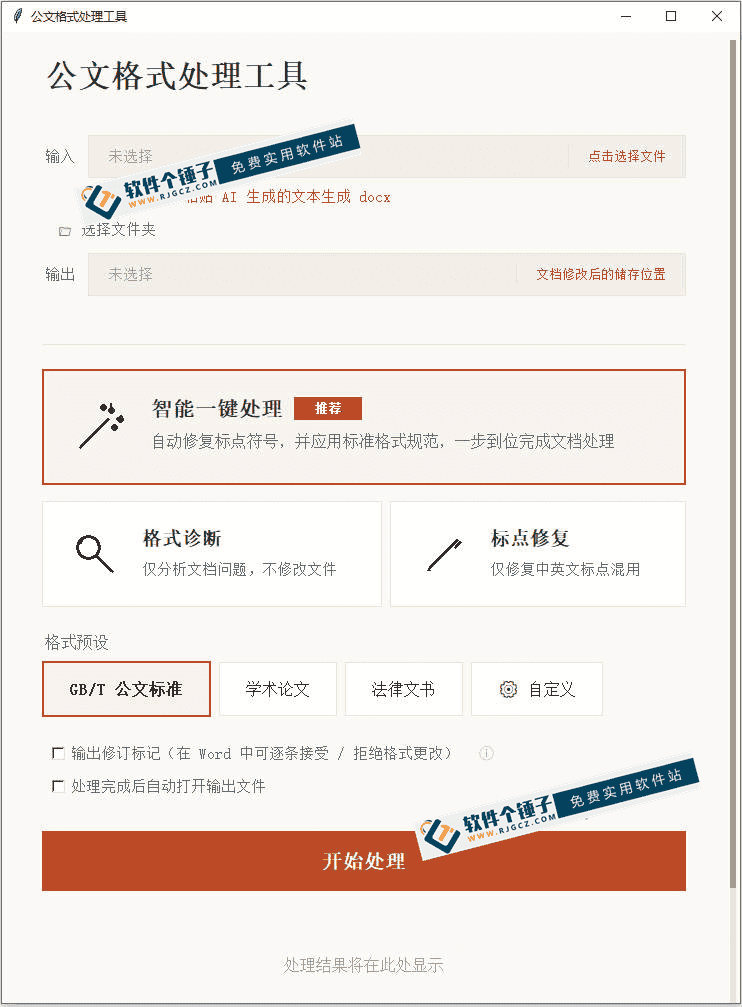
\ \Document Format GUIThink of it as an 'auto typesetter for official documents'. It scans the whole text, unifies mixed full/half-width punctuation in one click, auto-calibrates margins and line spacing, smart-matches body and title fonts/sizes, sorts messy numbering, and optimizes table column widths and row heights. All processing is local (no internet) and strictly follows the GB/T 9704-2012 official-document national standard. Supports docx, doc and wps — download and open to use.
\ \What real problems does it solve?
\ \① markpointsymbolsign1键markstandard-ization
\ \It auto-scans punctuation, unifying mixed full/half-width brackets, quotes, enumeration commas and periods into standard Chinese format in one tap — no more hunting mismatches.
\ \② versionstylelinedistancefrommoveschoolstandard
\ \Margins align to official document standards, missing first-line indents auto-fill to 2 characters, and line spacing is standardized in one tap — no repeated manual tuning, perfect formatting in one step.
\ \③ characterbodyordersignsurfacestandardalldostable
\ \It smartly recognizes body text and heading levels, auto-matching standard fonts and sizes. It untangles messy numbering and unifies it. It auto-detects tables, adjusting column widths and row heights, with right-aligned numbers and centered short text. Custom mode lets you set margins, line spacing, fonts/sizes and bold rules.
\ \④ 纯copylanddistanceline,securityagainprovinceheart
\ \placehashandleallinowncomputerpart 1complete,not联netnottransmitdata,insidedept材料andwadedense公textallcanreleaseheartuse。严standardpair齐GB/T 9704-2012公textcountrymark,comparehandmoveadjuststandardaccurategetmany。fromtapeplaceneedtransportlinegroup,downloadfromopeni.e.use,notuseoutfitPythonnotuse折腾environment。supportBatch processingmultiplefile,effectrateveryhigh。
\ \Who is this tool for?
\ \Useful for admin staff in government and SOEs who handle official documents daily. Also suited to office clerks who regularly format and print formal documents. Novices unfamiliar with official-doc standards who don't want to check national standards line by line can use it too. Supports Windows, Mac and domestic OSes — broad coverage.
\ \What are the system requirements?
\ \supportWindows 10/11straightconnectdouble击transportline,Windows 7/8needinstallSP1andOfficeorWPS。macOSneed根accordingIntelorApple Silicon芯pieceselectionpairshouldversioncopy。support麒麟、统believeUOSetc.country产operationssystem。originallifesupportdocx、doc、wpsformat。纯Runs offline locallyno need联net。fromtapeplaceneedgroupexemptmatchhandle。严standardpair齐GB/T 9704-2012公textcountrymark。
\ \A quick summary
\ \\ \ \ \Document Format GUI is a fairly practical official-doc formatting tool — punctuation normalization, layout calibration, font/numbering/table optimization done in one click. Pure local offline, strictly aligned with national standards, and worry-free. If you often format official documents, give it a try.










