
















担heartWindowssystem泄露隐私targettime候,youisnotisalsowant toexperiencedthese?
\ \A fresh Windows install feels like it's secretly uploading data in the background. Usage habits, location, search history — all seem collected. You go to settings to turn them off, but after several menu layers still can't find the toggles.
\ \Or you find an app quietly enabled camera/mic and want to manage all app permissions at once, but Windows settings are scattered. There's a dedicated tool that centralizes these privacy settings in one tap.
\ \What exactly is this tool?
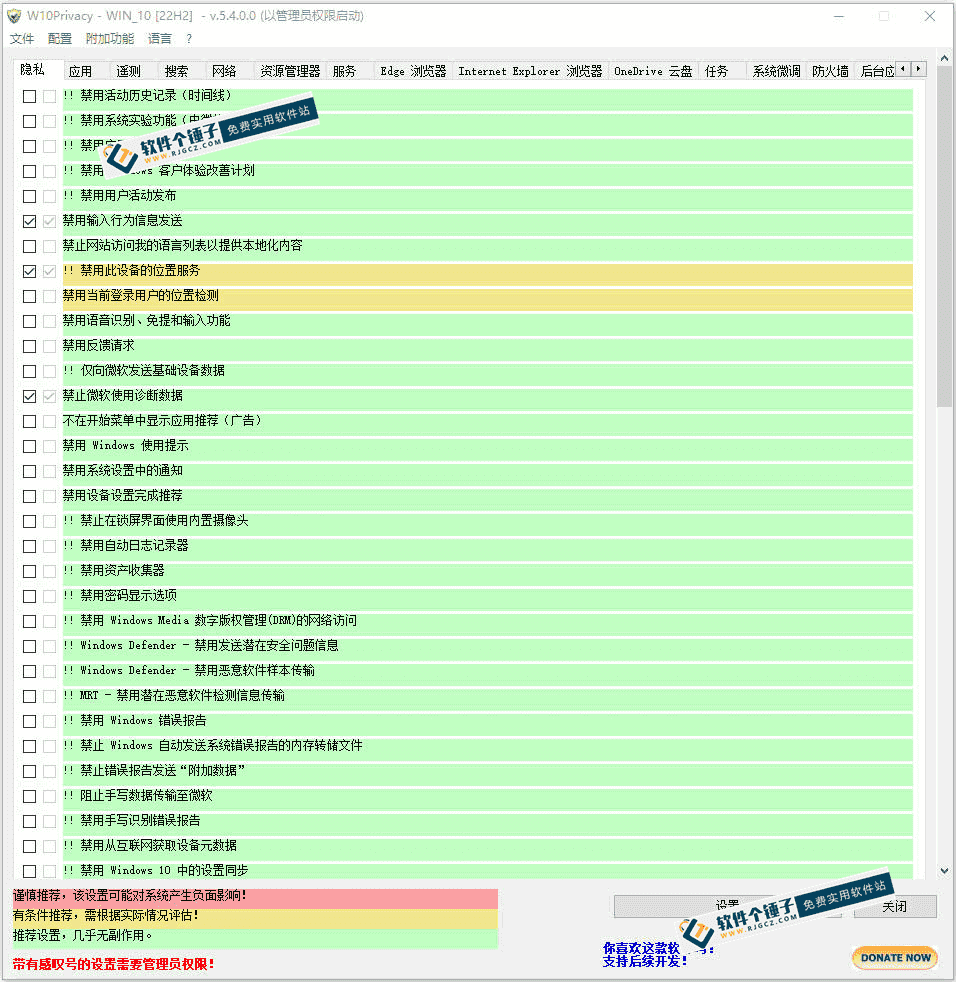
\ \W10PrivacyThink of it as a 'unified control panel for Windows privacy settings'. No need to dig through system settings one by one — open this tool to centrally manage telemetry, app permissions, web tracking, Cortana and all privacy features. No install; just open and use.
\ \What real problems does it solve?
\ \① 1键closeclosesystembackenddatareceivecollection
\ \It one-click disables Windows telemetry, diagnostics upload and usage-tracking, stopping privacy data to Microsoft. It cuts tracking at the source, without hunting through settings one toggle at a time.
\ \② collectionmidmanagementplacehasapptargetpowerlimit
\ \Permissions like camera, mic, location, contacts and notifications are managed centrally. See at a glance which app secretly uses your camera; just toggle off what you don't want.
\ \③ 拦截net络追踪,guarantee护part 1net隐私
\ \It blocks system telemetry IPs, turns off automatic online sharing, and disables background network access. You can also customize firewall privacy rules to block hidden data transfers and prevent leaks.
\ \④ 3colormarknote+preparecopyalsooriginal,notfearoperations失error
\ \Settings are color-coded green/yellow/red: green is safe and general, yellow needs care, red is advanced. Create a restore point before optimizing — revert in one tap if something breaks.
\ \Who is this tool for?
\ \Ordinary users who care about PC privacy will find it useful — no complex settings, just follow the color prompts. Advanced users who want fine-grained control of system data collection will find many low-level options. It also suits those who want to optimize privacy settings right after a fresh Windows install. No install needed — carry it on a USB drive.
\ \What are the system requirements?
\ \Supports Windows 10 and 11; fully portable and install-free — just double-click to run after download, no install steps. It's tiny, doesn't run resident in the background, and doesn't modify core system files, so it's safe. It's compatible with all Win10/Win11 versions, and its optimization rules track system updates.
\ \A quick summary
\ \\ \ \ \W10Privacy is a practical Windows privacy tool covering the main needs — disabling telemetry, managing permissions and network blocking. If you care about Windows privacy, give it a try.










