


-
Solo Business Courses
-
 Others
-
Overseas Tutorials
-
Photography & Editing
-
Community & Private Domain
-
Self-Media Writing & Copywriting
-
Side Income Projects
-
E-commerce
-
Short Video & Live Streaming
-
Artificial Intelligence (AI)
-
Software & Tools
-
Operating Systems
-
Plugins & Scripts
-
MacOS Software
-
Android Software
-
Windows Software
Creative Photo Effects — JixiPix Photo Formation v1.0.27 (English)
-
Game Gold-Farming Money-Making Plan: Earn 1k+ Daily, a Stable 3-Year Project Anyone Can Do in Spare Time [Revealed]
Study material — included with membership Get Membership -
Hot-game fully-automated earning: 500+ a day, no experience, simple operation - the steadiest long-term game-earning side hustle (revealed)
Study material — included with membership Get Membership -
FlyingMouse earns merit this time! Don't panic at Windows format problems — the open-source FlyingMouse format conversion tool helps, a popular GitHub gem
Study material — included with membership Get Membership -
Douyin Product-Selling Coaching Bootcamp: No On-Camera Appearance Needed, Newbies Can Produce Selling Short Videos by Following the Steps
Study material — included with membership Get Membership -
First-release game gold-farming money plan: 1K+ a day, ordinary people in spare time
Study material — included with membership Get Membership






-
FlyingMouse earns merit this time! Don't panic at Windows format problems — the open-source FlyingMouse format conversion tool helps, a popular GitHub gem
Study material — included with membership Get Membership -
LuDaShi v6.1024.4105.1121 Slim Single File
Study material — included with membership Get Membership -
2D Cartoon Animation Software Moho Pro v14.3
Study material — included with membership Get Membership -
Video Editor Aiseesoft Filmai v1.0.18
Study material — included with membership Get Membership -
To-Do Microsoft To Do v2.147 Free
Study material — included with membership Get Membership -
PR/AE/DaVinci/FCPX video Plugin Nobe OmniScope Win1.11.15 / Mac1.10.138
Study material — included with membership Get Membership





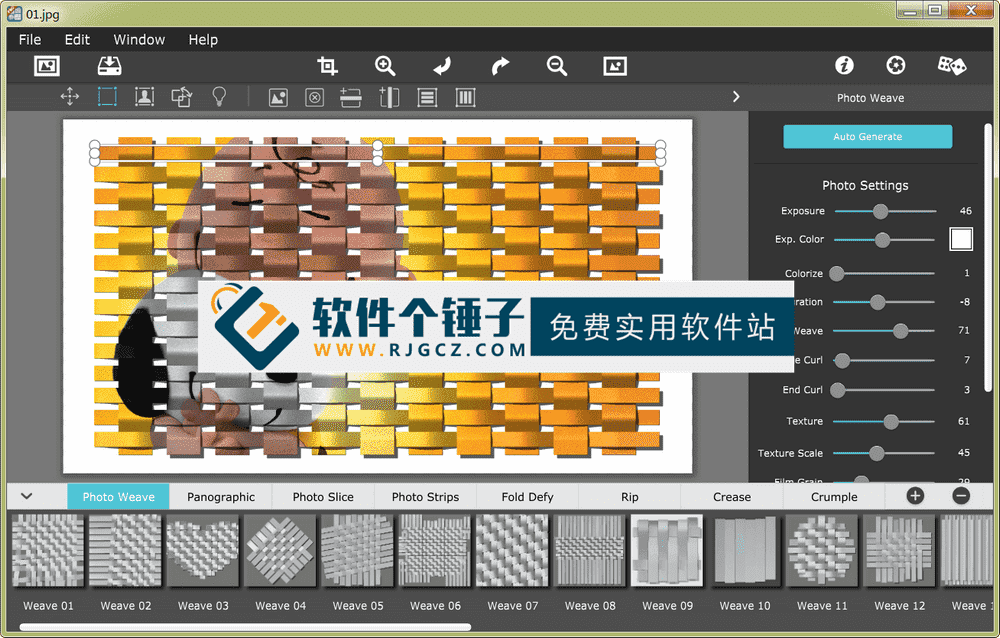
JixiPix Photo Formation automatically turns graphics into ultra-creative paper structures, then casts cool shadows with a 3D light engine. Split, connect, weave, slice and fold photos into engaging, eye-catching pieces — every crease, curl and bend looks carefully hand-assembled.
\ \
What is Photo Formation?
\ \JixiPix Photo Formation Pro is a photo effect that automatically turns graphics into ultra-creative paper structures, then casts cool shadows with a 3D light engine. Split, merge, weave, slice and fold photos into engaging, eye-catching pieces — every crease, curl and bend looks hand-assembled.
\ \Quickly start creating
\ \'Photo Form' has a one-click preset library to get you started, plus a random button that auto-renders various paper works until one suits you. Then customize each composition with move, rotate and scale — the sky's the limit!
\ \8 creative paper effects
\ \Includes 8 creative paper effects: Photo Weave, Panographic, Photo Slice, Photo Strips, Fold Defy, Rip, Crease and Crumple.
\ \Main Features
\ \1. Photo Weave – Photo Weave effect
\ \Split your image into columns and rows, then interlock them into a realistic basket weave. Weave multiple photos by selecting strips, and import a second image for clever weaving. All strips rotate, move and delete. Use the cool flip tool to swap strips up and down.
\ \2. Panographic – Panoramic collage effect
\ \Panorama automatically arranges multiple photos of a subject into a composed layout. Add shapes by selecting tiles, then import photos. You move and resize shapes as a whole or per photo tile.
\ \3. Photo Slice – Photo Slice effect
\ \Photo Slice slices graphics along lines you draw on the photo. Slice freely many times, or crisscross for a scattered look. Use pan and rotation to mismatch the pieces, then change slices from cut to torn. Have fun — that's photo art!
\ \4. Photo Strips – Photo Strips effect
\ \Photo Paper automatically cuts the photo into horizontal, vertical or radial strips. Choose the number, thickness, and whether ends curl. By bending strips into spirals and other shapes, the shape library takes this effect to another level.
\ \5. Fold Defy – Fold effect
\ \It auto-folds paper with ripple-like creases you control. Use columns and rows, plus up/down fold direction, to set the fold count. A powerful 3D lighting system creates highlights and shadows for truly popping paper.
\ \6. Rip – Rip effect
\ \Hover over a graphic to tear out a region, then switch mode to re-add regions. Crop a shape by picking one from the library, or import your own custom shape. Lower color strength to create a transparent background, then save as .png or .tif so they can be easily added to compositions.
\ \7. Crease – Crease effect
\ \Draw on the photo to crease it with line tools. Draw any number of creases, then set them up or down. Use the perspective slider for depth; it auto-adjusts shadows to lift the origami.
\ \8. Crumple – Crumple effect
\ \Crumple automatically wrinkles the image, like crumpling it into a ball then smoothing. Use the perspective slider to lift and fan the paper edges, and crumple/wrinkle/depth sliders to control ripple and crease counts. Adjustable surface light makes the paper look natural.
\ \Simple, easy-to-use interface
\ \We made it easy to use without losing the artist's control. If you're a hands-on creator who likes to start from scratch, the 'auto-generate' button kicks off a default paper effect to get you into creative mode, then shows a control panel to set things exactly your way. It's less work than it sounds — just specify how many strips, tiles or folds; how much curl, crease or depth; and exposure, opacity, grain and texture. The Apply button renders the result into the document, where you can move paper elements around (when needed) and add optional photo settings.
\ \Powerful 3D lighting system for photos
\ \A powerful lighting system makes photos distinctive. Photos directed in 2D space render into true 3D pop-ups with folds, creases and all the perspective distortions that cast realistic shadows — for stunning high-end effects! Lighting is fully adjustable: just move it around the document to change shadow direction. You can also duplicate light sources to create wonderful double and triple shadows — as many as you like!
\ \Multiple versions and plugin support
\ \'Photo Form' is available as a standard app, or integrated into your workflow via plugins for Photoshop, Elements, Lightroom, PaintShop Pro and Affinity Photo.
\ \Who is this software for?
\ \JixiPix Photo Formation suits graphic designers, photographers, digital artists, and anyone who wants unique paper-art effects on photos. Whether creative ads, art posters or personal art, it delivers stunning visuals.
\ \Example use cases
\ \E.g. add paper-fold effects to product photos, craft hand-made art posters, add creative elements to social images, design unique book covers, or make dimensional digital art.
\ \Operation
\ \It offers both simple one-click effects and deep custom control. The randomize button makes creative exploration fun, while detailed parameters let pros control every detail.
\ \3D lighting photo effect advantages
\ \Its 3D light engine is the core advantage — paper looks very real, and shadows/lighting give 2D images depth. Multi-light greatly expands creative possibilities.
\ \Usage Tips
\ \Start with presets and use the randomize button to explore. Once familiar, adjust 3D lighting to make paper effects more dimensional. Different paper effects can combine for more complex results.
\ \Creative value and pricing
\ \Paper art has unique visual charm, giving digital work a hand-made feel. In the digital age, simulating real material grabs attention and creates a unique look.
\ \Finally, to sum up
\ \JixiPix Photo Formation is an innovative paper-art effect tool that blends digital tech with traditional paper art. A powerful 3D lighting system and rich paper effects let users easily create stunning visuals. Whether quick effects or deep artistry, it's an ideal choice.
\ \ \ \Related Courses

Super local toolbox! Built-in screen recording, audio/video cutting & merging, video compression & extraction, forever free - Kedou Video Converter

100% perfect free tool! One-stop multi-function PDF software: PDF convert, compress, edit etc., minimal, no ads, so nice - JOPDF

Open-Source Desktop Remote Tool, Beats Paid Versions! Free for Personal and Commercial Use Unlimited, Cross-Platform, HopToDesk Remote Control

Latest K-12 Textbook Downloader: Whole-Grade Resource Download, Courseware, Video, Audio in One Click

HuyanBao: free blue-light eye-care app with pet break reminders

Windows Can Have a Desktop Dynamic Island Too! A Modern System Control Center — Give Your PC a Black Notch, PyIsland

3D Simulated Comic Drama Production: Seedance2.0 Full-Process Practical Course - From Zero to One High-Quality Comic Drama Creation

Win/Mac Dual Support! Latest Permanent Lifetime Version, Supports Old Photo Restoration, Image Sharpening and Lossless Upscaling Tool, Aiarty Image Enhancer

Online Video Course: Github Open-Source Bilibili Video Download Tool! Supports 8K and Dolby Vision Bilibili Video Batch Download Tool, Easy to Use Bilidown


