


-
Solo Business Courses
-
 Others
-
Overseas Tutorials
-
Photography & Editing
-
Community & Private Domain
-
Self-Media Writing & Copywriting
-
Side Income Projects
-
E-commerce
-
Short Video & Live Streaming
-
Artificial Intelligence (AI)
-
Software & Tools
-
Operating Systems
-
Plugins & Scripts
-
MacOS Software
-
Android Software
-
Windows Software

Media Player — VLC v3.0.23.0 (Win/Mac/Linux)
-
Game Gold-Farming Money-Making Plan: Earn 1k+ Daily, a Stable 3-Year Project Anyone Can Do in Spare Time [Revealed]
Study material — included with membership Get Membership -
Hot-game fully-automated earning: 500+ a day, no experience, simple operation - the steadiest long-term game-earning side hustle (revealed)
Study material — included with membership Get Membership -
FlyingMouse earns merit this time! Don't panic at Windows format problems — the open-source FlyingMouse format conversion tool helps, a popular GitHub gem
Study material — included with membership Get Membership -
Douyin Product-Selling Coaching Bootcamp: No On-Camera Appearance Needed, Newbies Can Produce Selling Short Videos by Following the Steps
Study material — included with membership Get Membership -
First-release game gold-farming money plan: 1K+ a day, ordinary people in spare time
Study material — included with membership Get Membership






-
FlyingMouse earns merit this time! Don't panic at Windows format problems — the open-source FlyingMouse format conversion tool helps, a popular GitHub gem
Study material — included with membership Get Membership -
LuDaShi v6.1024.4105.1121 Slim Single File
Study material — included with membership Get Membership -
2D Cartoon Animation Software Moho Pro v14.3
Study material — included with membership Get Membership -
Video Editor Aiseesoft Filmai v1.0.18
Study material — included with membership Get Membership -
To-Do Microsoft To Do v2.147 Free
Study material — included with membership Get Membership -
PR/AE/DaVinci/FCPX video Plugin Nobe OmniScope Win1.11.15 / Mac1.10.138
Study material — included with membership Get Membership





VLC media player is a very powerful, reliable and highly customizable media player. It lets you enjoy nearly all media formats and listen to your favorite web radio stations. We all know media files come in many formats, and not every player handles them all. Among available players, VLC is one of the best at handling them all.
\ \
Simple interface and powerful customization
\ \VLC Media Player has a simple, clean interface without flashy buttons or clutter. But don't be fooled by its plain looks — its strength is customizability. You can customize the whole layout via the Tools menu. Its PC version also has a playlist editor that can dock to the main player or float on the desktop, making file management easy. It includes a 12-band equalizer for fine-tuning sound with frequency sliders. Want a more immersive experience? One click switches to full screen. It even offers cool audio visualizations to choose from.
\ \Core feature highlights
\ \Next, let's take a detailed look at some of VLC's most impressive features:
\ \- \
\
- Enjoy all media formats and your favorite radio stations. \ \
- It supports GPU zero-copy for efficiency, and auto-falls back to software decoding when needed. \ \
- Wide input format support:Including MPEG family (ES, PS, TS, PVA, MP3), AVI, ASF / WMV / WMA, MP4 / MOV / 3GP, OGG / OGM / Annodex, Matroska (MKV), Real and more. \ \
- Audio format support:Like MPEG Layer ½, MP3 – MPEG Layer 3, AAC – MPEG-4 part3, Vorbis and more. \ \
- VLC has one of the most complete sets of video processing, subtitle-sync and A/V filters. \ \
- Subtitle support:DVD subtitles, many text subtitle formats (MicroDVD, SubRIP, SubViewer, SSA1-5, SAMI, VPlayer), and Vobsub. \ \
- Video codec support includes H.263/H.263i, H.264/MPEG-4 AVC, Cinepak, Theora and more. \ \
- Supports playback of DVDs, Video CDs/VCDs, SVCDs and other optical media. \ \
- Supports the Universal Subtitle Format (USF), SVCD/CVD, and more. \ \
- Many input media sources:It supports UDP/RTP unicast, UDP/RTP multicast, HTTP/FTP, MMS, TCP/RTP unicast and local files. \ \
- Video format support:MPEG-1/2, DIVX (1/2/3), MPEG-4 ASP, DivX 4/5/6, XviD, 3ivX D4, H.261 and more. \ \
- Rich video filters:Includes deinterlacing, image cropping, image wall, image adjustment, rotation/mirroring, logo overlay and more. \ \
How do I set the Chinese interface?
\ \If you just downloaded VLC and it's in English, don't worry — setting it to Chinese is very simple:
\ \- \
\
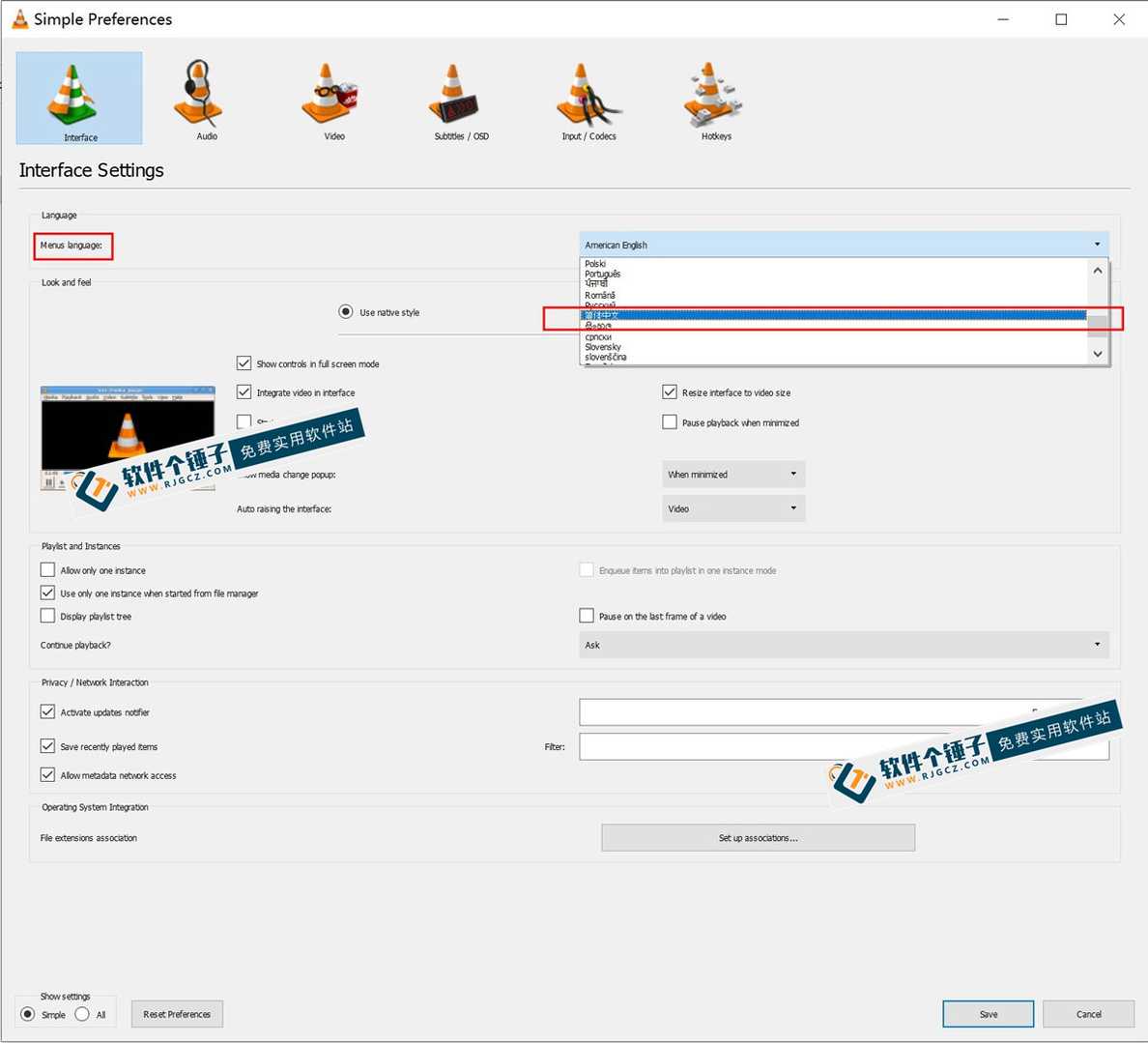
- Open the app, click 'Tools' in the top menu, then choose 'Preferences'.
 \
\
- In the settings window, find 'Menus language', choose 'Simplified Chinese' from the dropdown, then save.
 \
\
- Close the software and reopen it, and the interface will become the familiar Chinese! \ \
Version copy special notes
\ \What's provided here is portable. Just unzip the archive and open the program inside — no install, very convenient.
\ \ \ \Related Courses

Super local toolbox! Built-in screen recording, audio/video cutting & merging, video compression & extraction, forever free - Kedou Video Converter

100% perfect free tool! One-stop multi-function PDF software: PDF convert, compress, edit etc., minimal, no ads, so nice - JOPDF

Open-Source Desktop Remote Tool, Beats Paid Versions! Free for Personal and Commercial Use Unlimited, Cross-Platform, HopToDesk Remote Control

Latest K-12 Textbook Downloader: Whole-Grade Resource Download, Courseware, Video, Audio in One Click

HuyanBao: free blue-light eye-care app with pet break reminders

Windows Can Have a Desktop Dynamic Island Too! A Modern System Control Center — Give Your PC a Black Notch, PyIsland

3D Simulated Comic Drama Production: Seedance2.0 Full-Process Practical Course - From Zero to One High-Quality Comic Drama Creation

Win/Mac Dual Support! Latest Permanent Lifetime Version, Supports Old Photo Restoration, Image Sharpening and Lossless Upscaling Tool, Aiarty Image Enhancer

Online Video Course: Github Open-Source Bilibili Video Download Tool! Supports 8K and Dolby Vision Bilibili Video Batch Download Tool, Easy to Use Bilidown


