


-
Solo Business Courses
-
 Others
-
Overseas Tutorials
-
Photography & Editing
-
Community & Private Domain
-
Self-Media Writing & Copywriting
-
Side Income Projects
-
E-commerce
-
Short Video & Live Streaming
-
Artificial Intelligence (AI)
-
Software & Tools
-
Operating Systems
-
Plugins & Scripts
-
MacOS Software
-
Android Software
-
Windows Software
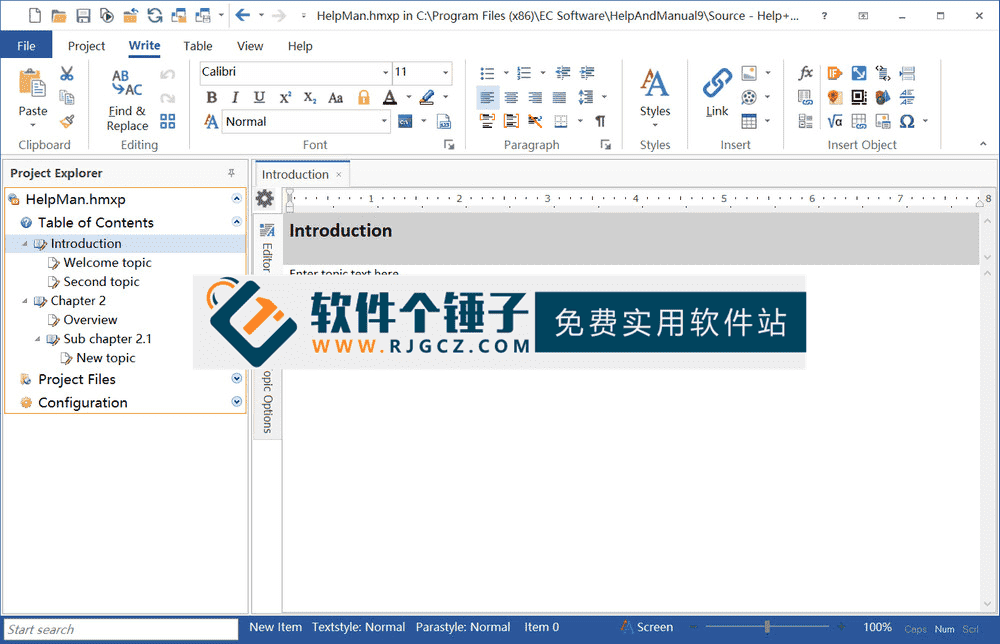
Document Editor — Help & Manual v10.0.3 (English)
-
Game Gold-Farming Money-Making Plan: Earn 1k+ Daily, a Stable 3-Year Project Anyone Can Do in Spare Time [Revealed]
Study material — included with membership Get Membership -
Hot-game fully-automated earning: 500+ a day, no experience, simple operation - the steadiest long-term game-earning side hustle (revealed)
Study material — included with membership Get Membership -
FlyingMouse earns merit this time! Don't panic at Windows format problems — the open-source FlyingMouse format conversion tool helps, a popular GitHub gem
Study material — included with membership Get Membership -
Douyin Product-Selling Coaching Bootcamp: No On-Camera Appearance Needed, Newbies Can Produce Selling Short Videos by Following the Steps
Study material — included with membership Get Membership -
First-release game gold-farming money plan: 1K+ a day, ordinary people in spare time
Study material — included with membership Get Membership






-
FlyingMouse earns merit this time! Don't panic at Windows format problems — the open-source FlyingMouse format conversion tool helps, a popular GitHub gem
Study material — included with membership Get Membership -
LuDaShi v6.1024.4105.1121 Slim Single File
Study material — included with membership Get Membership -
2D Cartoon Animation Software Moho Pro v14.3
Study material — included with membership Get Membership -
Video Editor Aiseesoft Filmai v1.0.18
Study material — included with membership Get Membership -
To-Do Microsoft To Do v2.147 Free
Study material — included with membership Get Membership -
PR/AE/DaVinci/FCPX video Plugin Nobe OmniScope Win1.11.15 / Mac1.10.138
Study material — included with membership Get Membership





If you need to create a professional help document for software, a product or a project, thenHelp And Manualis definitely a capable assistant. It's not just a help-authoring app but a full-featured creation platform. Its strongest point is generating at once5 different formats ofgeneral help files for various publishing needs. Even better, it has rich built-in extensions — inserting images, embedding AVI and other multimedia, OLE hyperlinks, bookmarks and macros. These powerful linking and extension abilities make your help files not only detailed butbeautiful interface and flexible interactiongreatly improving the reading experience. It's worth mentioning itsOLE linking featureIt's incredibly powerful — supports links to up to 26 file formats, and even handles undefined-format text, graphics, audio and animation — almost omnipotent.
\ \
What core features and highlights does it have?
\ \Help And Manual's professionalism is reflected in the following outstanding aspects:
\ \1. Professional-grade authoring core
\ \It is positioned as aprofessional, powerfulhelp file authoring program. It is designed from the ground up for producing high-quality technical documentation, by no means a simple text editor.
\ \2. Efficient XML WYSIWYG editor
\ \Its editing core isa pure XML-format WYSIWYG editorMeaning you edit layout intuitively like in Word, while underneath it generates clean, easy-to-process, convertible XML — balancing ease and professionalism.
\ \3. Powerful multi-format output capability
\ \This is its flagship feature. Through the editor, you can easily export projects to many mainstream formats, including:
\ \- \
\
- HTML Help (.CHM)The most classic help file format on Windows. \ \
- WebHelpHTML-based online help that can be viewed directly in a browser. \ \
- PDFdocumentGenerate portable documents that are easy to print and distribute. \ \
- Visual Studio HelpA help system suitable for development environments. \ \
- RTF rich text format:convenient for further editing in Word and other word processors。 \ \
- EXE e-book:generate executable e-book format that can run independently。 \ \
4. 熟悉目标文档编辑功能
\ \you don't need to start from scratch。it allows you to directlyedit existing CHM files, HTML web pages, plain text files and Word documents,and use these contents as a basis for editing and expansion, greatly improving work efficiency。
\ \5. 熟悉的操作环境
\ \software adopts aOffice 2007-style ribbon feature area (Ribbon) interfaceFor users familiar with Office, this UI is very intuitive, quick to learn and low-effort.
\ \who is it suitable for?
\ \the following 2 types of users will need Help And Manual:
\ \- \
\
- software developers:need to create detailed user manuals and help documents for application programs。 \ \
- technical documentation engineers:responsible for writing and maintaining complex product manuals, API documents, etc.。 \ \
- enterprise training personnel:produce internal department training materials or operation guides。 \ \
- knowledge base managers:need to build structured online help or support centers。 \ \
- individuals or teams that need to publish electronic documents in multiple formats。 \ \
In summary
\ \All in all,Help And Manualis a benchmark software in the field of help file creation。it willpowerful multi-format output capability (CHM/PDF/WebHelp etc.), flexible XML editor, convenient document editingandrich multimedia and link extension featuresperfectly integrated。itsprofessional positioning, easy-to-use editing experience and Office-like friendly interface, enabling everyone from technical writers to everyday users to efficiently create good-looking, professional help docs distributable across platforms. If you want an all-in-one tool for help-doc authoring and publishing, Help And Manual is a professional choice worth considering.
\ \ \ \Related Courses

Super local toolbox! Built-in screen recording, audio/video cutting & merging, video compression & extraction, forever free - Kedou Video Converter

100% perfect free tool! One-stop multi-function PDF software: PDF convert, compress, edit etc., minimal, no ads, so nice - JOPDF

Open-Source Desktop Remote Tool, Beats Paid Versions! Free for Personal and Commercial Use Unlimited, Cross-Platform, HopToDesk Remote Control

Latest K-12 Textbook Downloader: Whole-Grade Resource Download, Courseware, Video, Audio in One Click

HuyanBao: free blue-light eye-care app with pet break reminders

Windows Can Have a Desktop Dynamic Island Too! A Modern System Control Center — Give Your PC a Black Notch, PyIsland

3D Simulated Comic Drama Production: Seedance2.0 Full-Process Practical Course - From Zero to One High-Quality Comic Drama Creation

Win/Mac Dual Support! Latest Permanent Lifetime Version, Supports Old Photo Restoration, Image Sharpening and Lossless Upscaling Tool, Aiarty Image Enhancer

Online Video Course: Github Open-Source Bilibili Video Download Tool! Supports 8K and Dolby Vision Bilibili Video Batch Download Tool, Easy to Use Bilidown


