


-
Solo Business Courses
-
 Others
-
Overseas Tutorials
-
Photography & Editing
-
Community & Private Domain
-
Self-Media Writing & Copywriting
-
Side Income Projects
-
E-commerce
-
Short Video & Live Streaming
-
Artificial Intelligence (AI)
-
Software & Tools
-
Operating Systems
-
Plugins & Scripts
-
MacOS Software
-
Android Software
-
Windows Software
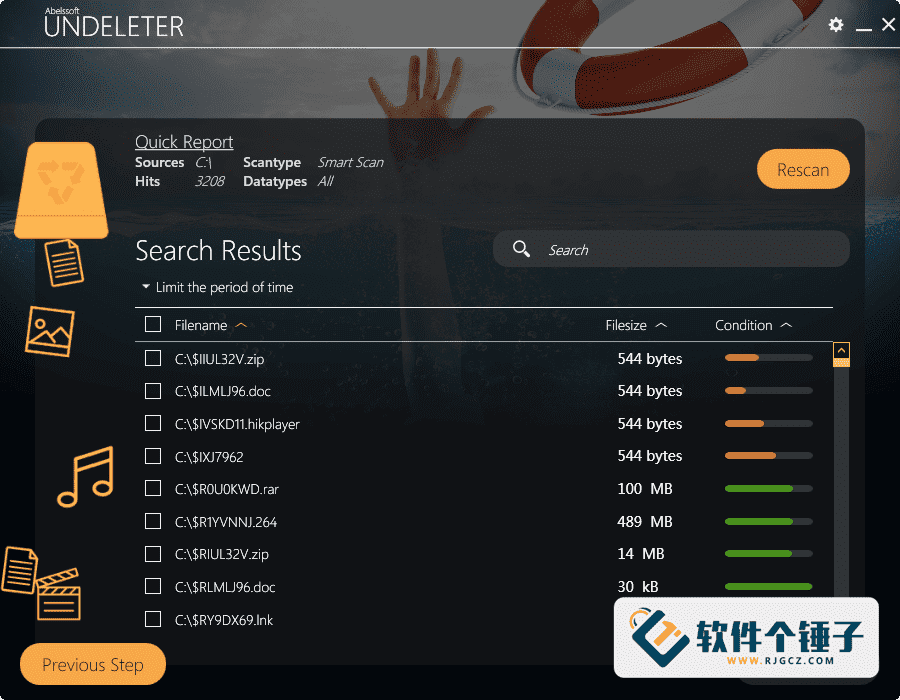

Data Recovery — Abelssoft Undeleter v8.01.56059 (English)
-
Game Gold-Farming Money-Making Plan: Earn 1k+ Daily, a Stable 3-Year Project Anyone Can Do in Spare Time [Revealed]
Study material — included with membership Get Membership -
Hot-game fully-automated earning: 500+ a day, no experience, simple operation - the steadiest long-term game-earning side hustle (revealed)
Study material — included with membership Get Membership -
FlyingMouse earns merit this time! Don't panic at Windows format problems — the open-source FlyingMouse format conversion tool helps, a popular GitHub gem
Study material — included with membership Get Membership -
Douyin Product-Selling Coaching Bootcamp: No On-Camera Appearance Needed, Newbies Can Produce Selling Short Videos by Following the Steps
Study material — included with membership Get Membership -
First-release game gold-farming money plan: 1K+ a day, ordinary people in spare time
Study material — included with membership Get Membership






-
FlyingMouse earns merit this time! Don't panic at Windows format problems — the open-source FlyingMouse format conversion tool helps, a popular GitHub gem
Study material — included with membership Get Membership -
LuDaShi v6.1024.4105.1121 Slim Single File
Study material — included with membership Get Membership -
2D Cartoon Animation Software Moho Pro v14.3
Study material — included with membership Get Membership -
Video Editor Aiseesoft Filmai v1.0.18
Study material — included with membership Get Membership -
To-Do Microsoft To Do v2.147 Free
Study material — included with membership Get Membership -
PR/AE/DaVinci/FCPX video Plugin Nobe OmniScope Win1.11.15 / Mac1.10.138
Study material — included with membership Get Membership





Abelssoft Undeleter is a professional data-recovery program. When you need to recover important data, it's a great choice. It helps you retrieve permanently deleted files and more. Through deep scanning, it also repairs corrupted files. When you accidentally delete files, you can use it to recover them — operation is very simple, so beginners get started easily.
\ \
What can this software do for you?
\ \Simply put, Abelssoft Undeleter is like installing a 'time-rewind' on your PC. Whether you slipped and deleted important files, emptied the recycle bin then remembered needed items, or a file is corrupted and won't open, it may recover or repair it.
\ \What are this software's standout features?
\ \1. Recover accidentally deleted files
\ \It can recover files you accidentally deleted, including all types of files permanently deleted from the recycle bin.
\ \2. Clean interface design
\ \The desktop is clean, and the scan list has filters, so even among a huge file list you find exactly what you need.
\ \3. Deep scan technology
\ \DEEP scan finds partially overwritten corrupted files and attempts repair.
\ \4. Smart scan feature
\ \The smart scan feature allows you to quickly complete a search of the hard drive, and can also search for filtered corrupted files.
\ \5. File preview display
\ \It allows you to preview files that can be repaired, and the deep scan allows you to quickly find small files.
\ \6. Corrupted file repair
\ \Corrupted files can be quickly modified and repaired.
\ \
How is it different from other recovery software?
\ \Abelssoft Undeleter's biggest feature is deep scanning and smart filtering. Many recovery tools just list every file they find, leaving users facing thousands with no idea which is theirs. But this tool has a good filter to pinpoint exactly. Its DEEP scan is truly thorough, even finding partially overwritten corrupted files and trying to repair them.
\ \Is it really simple to use?
\ \Yes, this tool is designed for everyday users. You needn't know professional data recovery — basically 'select disk → start scan → preview files → choose recovery'. The UI is intuitive, with no bewildering complex options.
\ \When is it most appropriate to use it?
\ \Use it right after you notice the problem! After a file is deleted, though the system marks it 'overwritable', recovery is very likely as long as new data hasn't overwritten it. If you keep saving to the drive, the original data may be overwritten — then recovery gets hard. So once you spot an accidental deletion, immediately stop using that disk and run Abelssoft Undeleter.
\ \Finally, to sum up
\ \Abelssoft Undeleter is a practical data-recovery tool designed for everyday users. It balances professionalism and ease, offering deep scanning and corrupted-file repair while keeping a clean, intuitive UI. Whether accidentally deleted work files or unexpectedly damaged important documents, it provides effective recovery. For non-IT users who regularly handle important files, it's a worthwhile data-safety tool.
\ \ \ \Related Courses

Super-lightweight C-Drive Manager for Windows! Very distinctive: disk analysis and cleanup reminders, 2MB size, completely free

Reinstall Without a USB Drive! This Tool Lets Newbies Quickly Reinstall Windows, Supports Unattended Setup, Data-Safe—CmzPrep_Rev2

A GitHub speed-up tool! Open GitHub faster, auto-responding to the fastest node - a lightweight open-source tool: Ghips

EasyRC: one-click Windows reinstall without USB, backup and restore included

Permanently Block Windows 10/11 Updates: Huawei Tool, Avoid Frequent Win Update Problems

Windows 7/10/11 System Update Blocker Is Here! Only 400KB, One-Click Disable System Updates and Restore Updates, Compact and Easy to Use

Stop Deleting Files Randomly! C Drive Red Alert Savior: Deep Cleanup + System Optimization, Works on Windows/macOS!

Office Fully-Automatic One-Click Deployment Installer, up to 2024, Customizable Components, Built-in Activation, All Free - Mocreak

Windows System Reinstall Tool, Supports Local Image File Install and Backup, Simple to Use, Safe and Stable, Supports All Scenarios

PC Acting Up? Newbie-Essential Driver Repair Tool—One-Click Update & Fix Driver Issues, It’s That Simple

