


-
Solo Business Courses
-
 Others
-
Overseas Tutorials
-
Photography & Editing
-
Community & Private Domain
-
Self-Media Writing & Copywriting
-
Side Income Projects
-
E-commerce
-
Short Video & Live Streaming
-
Artificial Intelligence (AI)
-
Software & Tools
-
Operating Systems
-
Plugins & Scripts
-
MacOS Software
-
Android Software
-
Windows Software
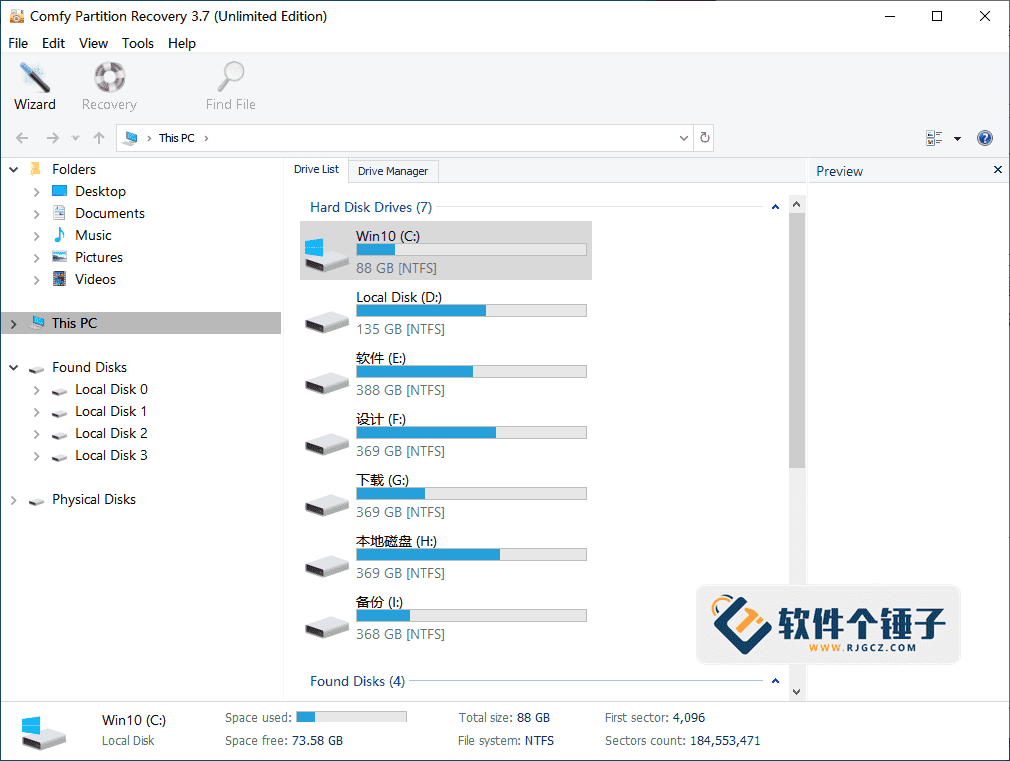
Data Recovery — Comfy Partition Recovery v5.1
-
Game Gold-Farming Money-Making Plan: Earn 1k+ Daily, a Stable 3-Year Project Anyone Can Do in Spare Time [Revealed]
Study material — included with membership Get Membership -
Hot-game fully-automated earning: 500+ a day, no experience, simple operation - the steadiest long-term game-earning side hustle (revealed)
Study material — included with membership Get Membership -
FlyingMouse earns merit this time! Don't panic at Windows format problems — the open-source FlyingMouse format conversion tool helps, a popular GitHub gem
Study material — included with membership Get Membership -
Douyin Product-Selling Coaching Bootcamp: No On-Camera Appearance Needed, Newbies Can Produce Selling Short Videos by Following the Steps
Study material — included with membership Get Membership -
First-release game gold-farming money plan: 1K+ a day, ordinary people in spare time
Study material — included with membership Get Membership






-
FlyingMouse earns merit this time! Don't panic at Windows format problems — the open-source FlyingMouse format conversion tool helps, a popular GitHub gem
Study material — included with membership Get Membership -
LuDaShi v6.1024.4105.1121 Slim Single File
Study material — included with membership Get Membership -
2D Cartoon Animation Software Moho Pro v14.3
Study material — included with membership Get Membership -
Video Editor Aiseesoft Filmai v1.0.18
Study material — included with membership Get Membership -
To-Do Microsoft To Do v2.147 Free
Study material — included with membership Get Membership -
PR/AE/DaVinci/FCPX video Plugin Nobe OmniScope Win1.11.15 / Mac1.10.138
Study material — included with membership Get Membership





Did you accidentally format your hard drive? Or delete/modify the drive's filesystem? Or does your PC suddenly say the partition is damaged and needs formatting? Regular PC users have likely hit these headaches, but don't worry — Comfy Partition Recovery helps you quickly and easily recover those lost files.
\ \
What is this software used for?
\ \Comfy Partition Recovery is built to handle damaged, deleted or erroring drive partitions. It recovers lost files and the drive's original directory structure — specific files, filenames, original locations and more. It supports many popular filesystems: NTFS, ReFS, FAT, exFAT, APFS, HFS+, Ext2/3/4, XFS, ReiserFS, UFS 1/2 — and is compatible with all Windows versions including Windows 10.
\ \How does it work?
\ \Comfy Partition Recovery uses a complex algorithm to analyze your chosen drive, searching for existing partitions and restoring all files and folders not yet overwritten by new data. These files may have been lost from formatting, system faults, emptying the recycle bin, virus attacks, or direct deletion. The software restores all file types — images, documents, music, videos, databases, archives, executables, and more.
\ \What else can it recover besides hard drives?
\ \Besides recovering data from PC drives, Comfy Partition Recovery supports any storage device — USB drives, MP3 players, digital recorders, cameras, various flash cards, phone memory cards and more. It has a handy preliminary preview so you can browse file contents before actually recovering, confirming they're what you want.
\ \Which file types does it support recovering?
\ \1. Presentation files
\ \It recovers presentations from Microsoft PowerPoint and Open Impress — e.g. pptx, ppt, pptm, potx, potm, pot, thmx, pps, ppsx, ppam, ppa, odp, otp.
\ \2. Text documents
\ \It recovers text documents created with Microsoft Word, Adobe PDF, Open and Star Writer — e.g. xps, doc, docx, docm, dot, dotm, PDF, wpd, wps, odt, ott, odm and other files.
\ \3. Various text and code files
\ \It can recover txt, asp, aspx, chm, cue, def, inc, inf, lnk, o, php, pro, rc, rsc, s, set, sql, sub, sys, 1st, cal, css, ctt, dic, es, fil, gadget, xhtml, xhtm, htm, html, ics, log, part, pf and swp files, plus various text documents, settings files, logs and program source code.
\ \4. Electronic spreadsheets
\ \It recovers spreadsheets from Microsoft Excel and Open Calc — e.g. xl, xlsx, xlsm, xlsb, xlam, xltx, xltm, xls, xlt, xlm, xlw, ods, ots.
\ \5. Digital images and photos
\ \It can recover digital images and photos taken with professional cameras, webcams, mobile phones, PDAs and tablet computers.
\ \6. Audio and video files
\ \It recovers music, audio tracks and video in avi, dat, mkv, mov, mpg, vob, wmv, m4p, mp3, wav and wma.
\ \7. Archives
\ \It recovers various archives — rar, zip, 7z, ace, arj, bz2, cab, gz, iso, jar, lzh, tar, uue and z.
\ \What are this software's standout features?
\ \1. Extensive device support
\ \It can recover data from any storage device, with strong compatibility.
\ \2. All-round file type support
\ \It supports recovering all kinds of files; basically all files on your computer from Part 1 can be handled.
\ \3. Recycle Bin file recovery
\ \It supports recovering files deleted from the Recycle Bin.
\ \4. Formatted drive recovery
\ \It supports recovering data from formatted drives.
\ \5. Mainstream file system support
\ \It supports recovering data from FAT and NTFS, the two most common file systems.
\ \6. Extensive media support
\ \It supports recovering data from any type of storage media.
\ \7. Data saving feature
\ \It supports saving recovered data to the location you specify.
\ \8. Compatible with all Windows systems
\ \Supports all major MS Windows systems, including Windows 10/8/7/Vista/XP/2003/2000/NT.
\ \9. Familiar operation interface
\ \It uses a Windows Explorer-style interface, making it feel just like browsing files in Windows — very intuitive and familiar.
\ \Finally, to sum up
\ \Comfy Partition Recovery is a comprehensive, easy-to-use partition data-recovery solution. It handles hard-drive formatting, partition damage and filesystem errors, and supports a wide range of filesystems and storage devices for strong recovery assurance. Its intuitive Explorer-style interface and file preview lower the recovery barrier. Whether accidental formatting or complex partition damage, Comfy Partition Recovery is a reliable assistant that helps you recover valuable work files and personal data.
\ \ \ \Related Courses

Super-lightweight C-Drive Manager for Windows! Very distinctive: disk analysis and cleanup reminders, 2MB size, completely free

Reinstall Without a USB Drive! This Tool Lets Newbies Quickly Reinstall Windows, Supports Unattended Setup, Data-Safe—CmzPrep_Rev2

A GitHub speed-up tool! Open GitHub faster, auto-responding to the fastest node - a lightweight open-source tool: Ghips

EasyRC: one-click Windows reinstall without USB, backup and restore included

Permanently Block Windows 10/11 Updates: Huawei Tool, Avoid Frequent Win Update Problems

Windows 7/10/11 System Update Blocker Is Here! Only 400KB, One-Click Disable System Updates and Restore Updates, Compact and Easy to Use

Stop Deleting Files Randomly! C Drive Red Alert Savior: Deep Cleanup + System Optimization, Works on Windows/macOS!

Office Fully-Automatic One-Click Deployment Installer, up to 2024, Customizable Components, Built-in Activation, All Free - Mocreak

Windows System Reinstall Tool, Supports Local Image File Install and Backup, Simple to Use, Safe and Stable, Supports All Scenarios

PC Acting Up? Newbie-Essential Driver Repair Tool—One-Click Update & Fix Driver Issues, It’s That Simple

