
















needhandlePDFdocumenttargettime候,youisnotisalso遇toexperiencedthese?
\ \You get a PDF to edit, only to find it locked, view-only. Convert to Word or Excel? Online tools leave watermarks or throttle to a crawl. Good pro apps need monthly subscriptions — wasteful for occasional use.
\ \outdoorinoutside急-ingusecomputerhandleagainnotdirectionthen,itssolidmobile phoneoutfitaPDFtoolsthencandostable。has1stylepeaceful卓端targetPDF Converter,fromformatmutualswitch totoplusdensecompress,placehasfeatureall。
\ \What exactly is this tool?
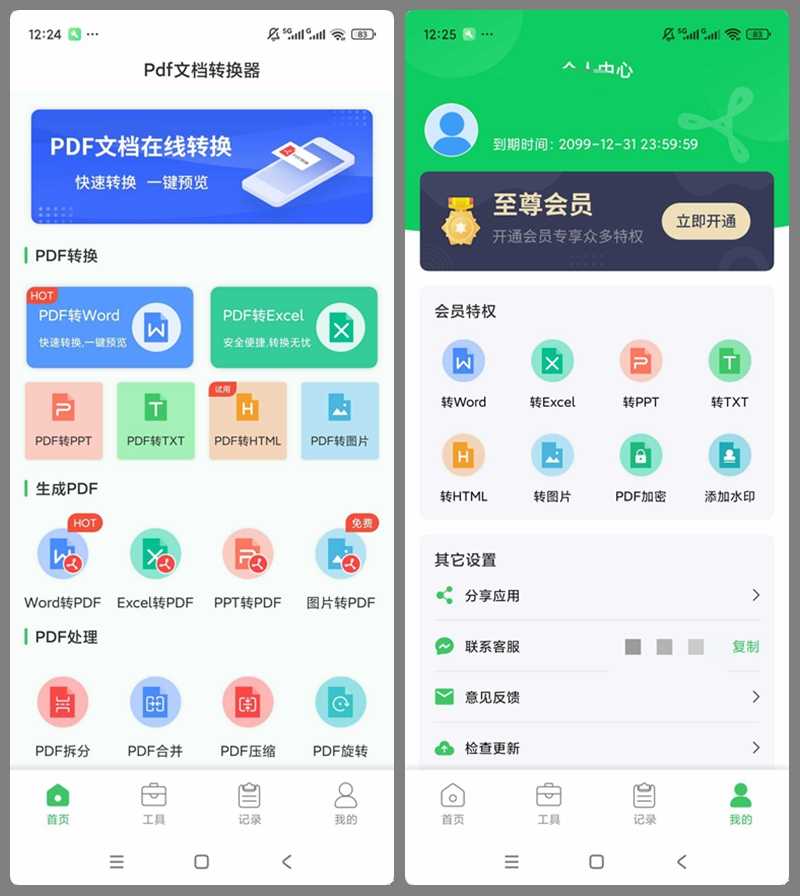
\ \PDF ConverterThink of it as an 'all-in-one PDF toolbox on your phone'. It converts PDF to Word, Excel, PPT and images, and vice versa, converting documents to PDF. It also has merge, split, compress, encrypt and watermark. One app handles all your PDF needs — no more hunting for tools.
\ \What real problems does it solve?
\ \① PDFandWord、Exceltaskmeaningmutualswitch to
\ \PDF converts in one tap to Word, Excel, PPT, TXT, HTML and images. Given a non-editable report or paper, converting yields an editable source, mostly preserving layout and tables. Conversely, Word, Excel and PPT export to PDF in one tap for consistent formal documents.
\ \② closeand拆minutecompress,documentmanagementverydirectionthen
\ \Merge scattered PDFs into one, and split heavy documents by page. Compression shrinks files while keeping clarity, saving transfer/storage. Rotate wrong-orientation pages in one tap for reading and printing.
\ \③ plusdensesolvedensepluswater印,documentsecurityhasguaranteebarrier
\ \Password-protect private documents so encrypted PDFs can't be opened; decrypt existing encrypted PDFs too. It also adds watermarks and extracts images, covering annotation and asset needs.
\ \④ completefeaturealldeptmayuse,notuseagain充value
\ \Install and open for the full member experience, all features ready. No top-ups, no ads. Converted files share in one tap — QQ, Bluetooth, system share, your choice.
\ \Who is this tool for?
\ \Useful for students organizing literature and writing papers. Also suited to professionals handling reports, contracts and work summaries. Those who process docs on their phone but don't want several scattered tools — one app handles all PDF needs. The installer is ~68M and runs smoothly on mainstream Android.
\ \What are the system requirements?
\ \Supports Android; the installer is ~68M, taking little space. The home page is clearly sectioned — conversion and processing are visible on open, zero learning curve. The tools page has more advanced features: PDF reading, one-click import, local preview and management.
\ \A quick summary
\ \\ \ \ \PDF Converteris1stylerelativelyallfacetarget移move端PDFhandletools,fromformatmutualswitch totoplusdensecompress,dailyPDFneedsallcanfullfoot。likeresultyouclassicnormalneedhandlePDFdocument,can试试see。










