
















inmobile phonepart 1handledocumenttargettime候,youisnotisalso遇toexperiencedthese?
\ \Your phone holds Word, PDF and TXT docs; tapping one pops up an 'open with' dialog. You've installed several readers each for a purpose; switching is a hassle and eats memory. Want to convert PDF to Word or scan a contract — install yet another tool.
\ \Actually there's a lightweight document tool — one app handles all-format reading, conversion and PDF editing. Clean, ad-free, offline — no pile of duplicate apps.
\ \What exactly is this tool?
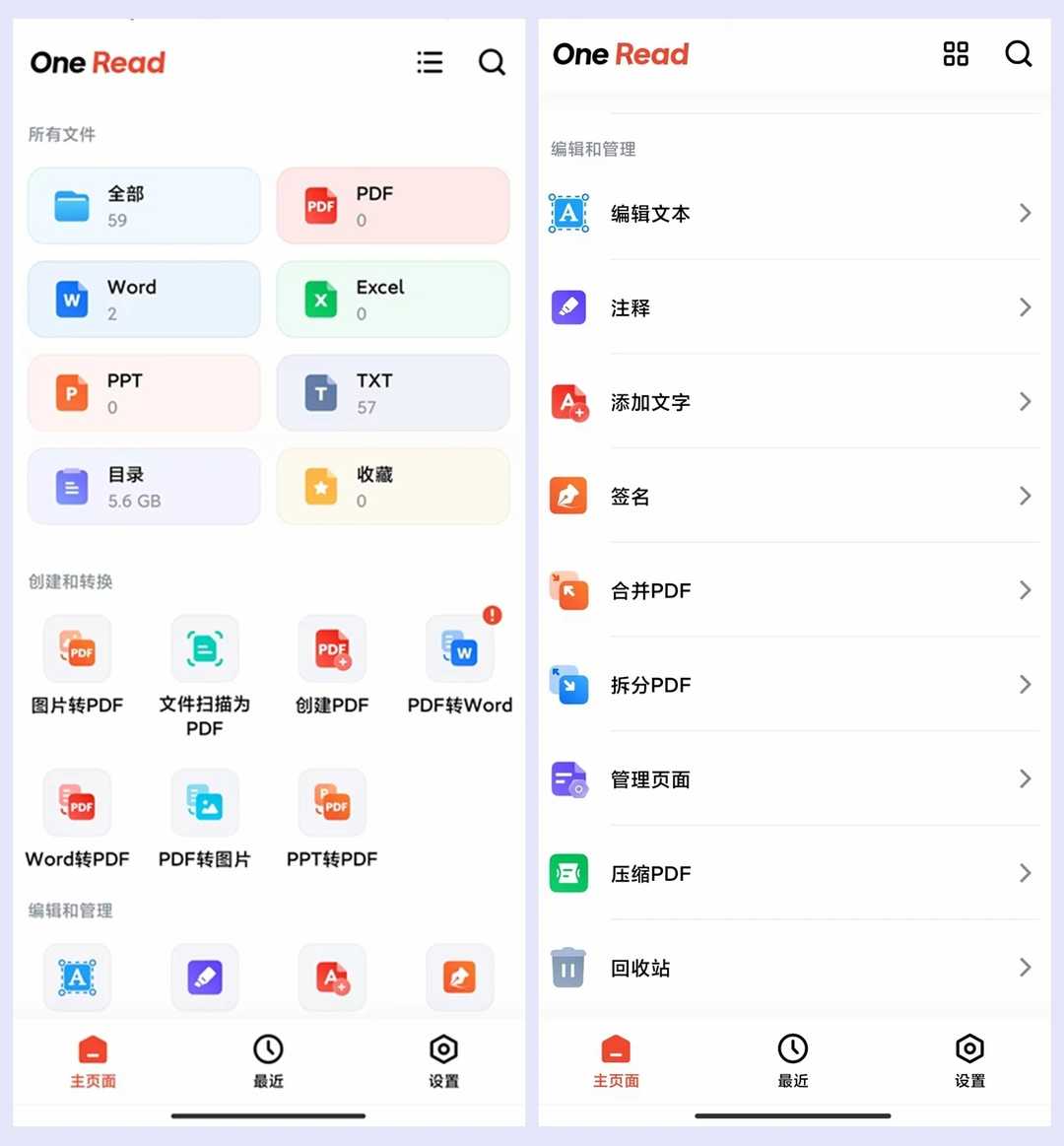
\ \One ReadThink of it as a 'Swiss Army knife for documents on your phone'. PDF, Word, Excel, PPT, TXT open instantly for reading and interconvert. Built-in PDF editing lets you add text, signatures, merge and split files. Snap a paper contract and it auto-crops a clear digital copy. All features work offline, no ads, with a recycle bin to prevent accidental deletion.
\ \What real problems does it solve?
\ \① allformatsecondopen阅read,aAppthenenough
\ \PDF, Word, Excel, PPT and TXT open instantly, with smooth, lag-free zoom and scrolling. Files are grouped by format — All, PDF, Word, Excel at a glance, no need to scour the phone. Switch freely between card and list views. Built-in keyword search locates clauses in long contract documents.
\ \② Full format conversion,mobile phonepart 1thencandostable
\ \Image to PDF, Word to PDF, PPT to PDF, PDF to Word, PDF to image — all one tap. It also creates blank PDFs to edit on demand. No converter, no PC — all on your phone.
\ \③ documentscan媲beautifulprofessionalscan仪,paperqualityfilechangeelectronics档
\ \Photograph paper documents/contracts; the app auto-detects edges and offers auto-crop or no-crop. After correction it generates a clean, neat digital copy rivaling a pro scanner. It supports original/auto/document/B&W/enhanced quality modes, with direct re-shoot, rotate and crop.
\ \④ PDFeditallability,alsotapereplayreceivestation防error删
\ \It supports text editing, adding text, inserting annotations, and directly editing/highlighting content. You can add handwritten signatures — e-sign contracts without printing. It has PDF merge/split, page management and PDF compression. A built-in recycle-bin recovers accidentally deleted files. All features work offline — usable without a network.
\ \Who is this tool for?
\ \Useful if you often view various document formats on your phone. Also suited to office workers who scan paper contracts to digital and convert formats. Offline features are handy for frequent travelers. Those who don't want redundant apps can use it too. Clean, ad-free UI and easy to pick up.
\ \What are the system requirements?
\ \Supports Android. All core features work offline — no login, no network. No splash or popup ads. Files organized by format, with card and list views. Built-in recycle bin prevents accidental deletion. Keyword search quickly locates document content.
\ \A quick summary
\ \\ \ \ \One Read is a fairly practical mobile document tool — all-format reading, conversion, PDF editing and scanning integrated in one clean, ad-free, offline app. If you keep many documents on your phone, give it a try.










