


-
Solo Business Courses
-
 Others
-
Overseas Tutorials
-
Photography & Editing
-
Community & Private Domain
-
Self-Media Writing & Copywriting
-
Side Income Projects
-
E-commerce
-
Short Video & Live Streaming
-
Artificial Intelligence (AI)
-
Software & Tools
-
Operating Systems
-
Plugins & Scripts
-
MacOS Software
-
Android Software
-
Windows Software
Windows Theme Unlocker — SecureUxTheme v4.0.0 (Free Open Source)
-
Game Gold-Farming Money-Making Plan: Earn 1k+ Daily, a Stable 3-Year Project Anyone Can Do in Spare Time [Revealed]
Study material — included with membership Get Membership -
Hot-game fully-automated earning: 500+ a day, no experience, simple operation - the steadiest long-term game-earning side hustle (revealed)
Study material — included with membership Get Membership -
FlyingMouse earns merit this time! Don't panic at Windows format problems — the open-source FlyingMouse format conversion tool helps, a popular GitHub gem
Study material — included with membership Get Membership -
Douyin Product-Selling Coaching Bootcamp: No On-Camera Appearance Needed, Newbies Can Produce Selling Short Videos by Following the Steps
Study material — included with membership Get Membership -
First-release game gold-farming money plan: 1K+ a day, ordinary people in spare time
Study material — included with membership Get Membership






-
FlyingMouse earns merit this time! Don't panic at Windows format problems — the open-source FlyingMouse format conversion tool helps, a popular GitHub gem
Study material — included with membership Get Membership -
LuDaShi v6.1024.4105.1121 Slim Single File
Study material — included with membership Get Membership -
2D Cartoon Animation Software Moho Pro v14.3
Study material — included with membership Get Membership -
Video Editor Aiseesoft Filmai v1.0.18
Study material — included with membership Get Membership -
To-Do Microsoft To Do v2.147 Free
Study material — included with membership Get Membership -
PR/AE/DaVinci/FCPX video Plugin Nobe OmniScope Win1.11.15 / Mac1.10.138
Study material — included with membership Get Membership





With innovative memory-injection, open-source transparency and flexible customization, SecureUxTheme brings a fresh approach to Windows theming. It breaks the old idea that 'personalization must sacrifice security', letting users enjoy rich themes without worrying about stability or safety. Whether compliance-focused enterprises, curious tech enthusiasts, or everyday users wanting stable third-party themes, SecureUxTheme is a notable choice in Windows desktop customization, leading theming toward a safer, more open era.
\ \
Innovative memory injection technology
\ \SecureUxTheme's most notable advantage is its innovative principle. Unlike tools that directly modify uxtheme.dll and other system files, it dynamically loads third-party themes at runtime via memory injection, never touching core system files. This fundamentally avoids stability risks from modifying system files, and needs no disabling of System File Protection or Windows Defender real-time monitoring — making theming safer and more compliant.
\ \Broad system compatibility
\ \The tool supports all modern Windows from 8.1 to 11, with excellent compatibility on the latest Win10/11. It not only grants third-party theme installation rights but supports live theme preview and custom element priority. Users can fine-tune window colors, fonts and control layout, and even apply different themes to different app windows — far more freedom than traditional tools.
\ \Modular operation experience
\ \SecureUxTheme uses a modular design with two operation modes. For everyday users, the graphical SecureUxTheme Manager offers visual operation: unzip and run after download, click Install to set up the service, then pick a third-party theme in the system Personalization settings — no reboot needed. The whole process is simple and intuitive, seamlessly matching the official-theme experience.
\ \Open-source transparency
\ \As open-source software, SecureUxTheme's development is fully transparent — anyone can read the code, audit security or contribute features. This community-driven model ensures security: potential vulnerabilities are quickly found and fixed, and features iterate based on user feedback. Versus closed-source tools, open-source status earns more user trust, suiting privacy- and security-sensitive users.
\ \Tool comparison and precautions
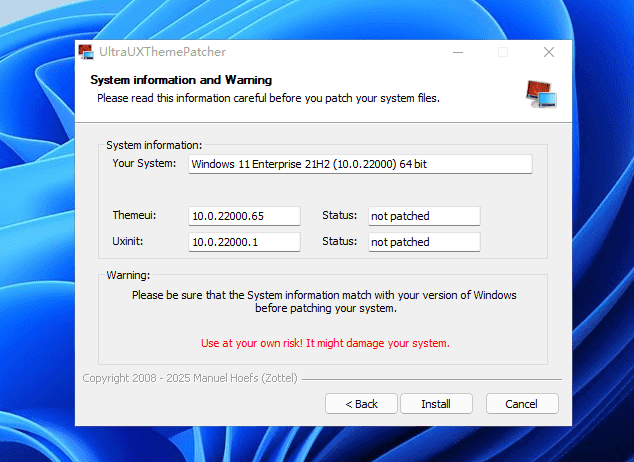
\ \Compared to UltraUXTheme Patcher, SecureUxTheme's core advantages are the stability and safety of not modifying system files, plus ongoing updates from the open-source community. However, its GUI is relatively basic, and some advanced settings require editing config files manually — a learning curve for beginners. And because it uses memory injection, in rare cases certain antivirus may false-positive; just add the tool to the trust list.
\ \Supported operating systems
\ \Windows 8.1 x86/x64
\
Windows Server 2012 R2 x86/x64
\
Windows 10 x86/x64/ARM64
\
Windows Server 2016/2019/2022 x86/x64
\
Windows 11 (RTM -> 24H2) x86/x64/ARM64
\
Windows Server 2025 x86/x64/ARM64
Future versions (not yet tested) x86/x64/ARM64
Official open-source repo: https://github.com/namazso/SecureUxTheme
\ \ \ \Related Courses

Super local toolbox! Built-in screen recording, audio/video cutting & merging, video compression & extraction, forever free - Kedou Video Converter

100% perfect free tool! One-stop multi-function PDF software: PDF convert, compress, edit etc., minimal, no ads, so nice - JOPDF

Open-Source Desktop Remote Tool, Beats Paid Versions! Free for Personal and Commercial Use Unlimited, Cross-Platform, HopToDesk Remote Control

Latest K-12 Textbook Downloader: Whole-Grade Resource Download, Courseware, Video, Audio in One Click

HuyanBao: free blue-light eye-care app with pet break reminders

Windows Can Have a Desktop Dynamic Island Too! A Modern System Control Center — Give Your PC a Black Notch, PyIsland

3D Simulated Comic Drama Production: Seedance2.0 Full-Process Practical Course - From Zero to One High-Quality Comic Drama Creation

Win/Mac Dual Support! Latest Permanent Lifetime Version, Supports Old Photo Restoration, Image Sharpening and Lossless Upscaling Tool, Aiarty Image Enhancer

Online Video Course: Github Open-Source Bilibili Video Download Tool! Supports 8K and Dolby Vision Bilibili Video Batch Download Tool, Easy to Use Bilidown


