
















youisnotisclassicnormal遇tothesescenarios?
\ \Want to clip a great play to send a friend, but the built-in recorder is low-quality and time-limited. Making a tutorial means screenshotting each step until your hand aches. Or a long web page that ordinary screenshots can't capture, forcing several shots to stitch.
\ \Annoyingly, recording ends with a few seconds of dead footage to trim in another editor. Actually one app does it all — screenshots, screen/audio recording and simple editing, end to end.
\ \What exactly is it for?
\ \Apowersoft Screen Capture ProThink of it as an 'all-purpose screen recorder'. Screenshots, screen recording, even system audio or mic narration — it does it all. After recording you edit right there, no other app.
\ \What real problems does it solve?
\ \① recordsystem屏幕part 1targettaskwhatcampaign
\ \Game highlights, online meetings or software tutorials — record them as video. Full-screen or custom-region capture; record system audio only or include the mic — very flexible.
\ \② 截picturealsocan滚move截longpicture
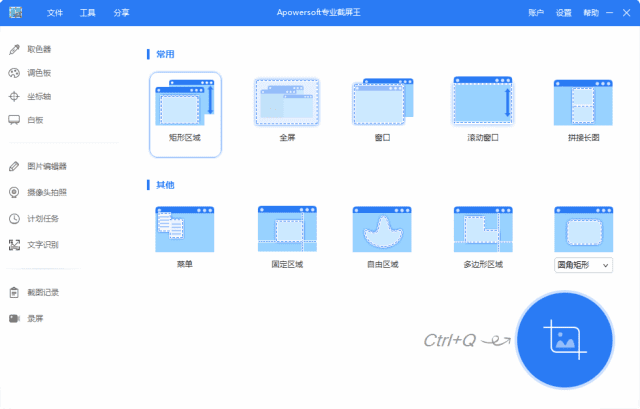
\ \It supports full-screen, window and custom-region capture; most useful is scrolling — web pages, chats, long docs captured in one shot, no stitching. After capture you add arrows, text and mosaic annotations.
\ \③ recordsystembackstraightconnecteditinghandle
\ \No need for a separate editor — built-in tools trim, merge and add effects. Removing extra clips, joining videos and adding simple effects all happen here.
\ \④ 1键sharinggivefriendfriendorsamething
\ \After capturing or recording, share directly via email or social media — no save-then-upload. Great for tutorials, work reports and bug reports.
\ \Who can make use of it?
\ \If you often make tutorials, record courses or game videos, or need screenshots of steps / recordings of online meetings at work, this tool is handy. Self-media creators record screen footage, and product demos record workflows to send clients. Supports Windows and Mac, broad coverage.
\ \What are the system requirements?
\ \It supports Windows and Mac — just download and unzip, no install. Rich output: video MP4, AVI, FLV, MKV, GIF; image PNG and more — easy for later use and sharing.
\ \A quick summary
\ \\ \ \ \Apowersoft Screen Capture Pro is a fairly comprehensive capture tool — recording, screenshots, audio, editing and sharing all in one, no switching. If you record screens and take screenshots often, give it a try.










