


-
Solo Business Courses
-
 Others
-
Overseas Tutorials
-
Photography & Editing
-
Community & Private Domain
-
Self-Media Writing & Copywriting
-
Side Income Projects
-
E-commerce
-
Short Video & Live Streaming
-
Artificial Intelligence (AI)
-
Software & Tools
-
Operating Systems
-
Plugins & Scripts
-
MacOS Software
-
Android Software
-
Windows Software
Scientific Calculator — Calcpad v7.3.6 (English)
-
Game Gold-Farming Money-Making Plan: Earn 1k+ Daily, a Stable 3-Year Project Anyone Can Do in Spare Time [Revealed]
Study material — included with membership Get Membership -
Hot-game fully-automated earning: 500+ a day, no experience, simple operation - the steadiest long-term game-earning side hustle (revealed)
Study material — included with membership Get Membership -
FlyingMouse earns merit this time! Don't panic at Windows format problems — the open-source FlyingMouse format conversion tool helps, a popular GitHub gem
Study material — included with membership Get Membership -
Douyin Product-Selling Coaching Bootcamp: No On-Camera Appearance Needed, Newbies Can Produce Selling Short Videos by Following the Steps
Study material — included with membership Get Membership -
First-release game gold-farming money plan: 1K+ a day, ordinary people in spare time
Study material — included with membership Get Membership






-
FlyingMouse earns merit this time! Don't panic at Windows format problems — the open-source FlyingMouse format conversion tool helps, a popular GitHub gem
Study material — included with membership Get Membership -
LuDaShi v6.1024.4105.1121 Slim Single File
Study material — included with membership Get Membership -
2D Cartoon Animation Software Moho Pro v14.3
Study material — included with membership Get Membership -
Video Editor Aiseesoft Filmai v1.0.18
Study material — included with membership Get Membership -
To-Do Microsoft To Do v2.147 Free
Study material — included with membership Get Membership -
PR/AE/DaVinci/FCPX video Plugin Nobe OmniScope Win1.11.15 / Mac1.10.138
Study material — included with membership Get Membership





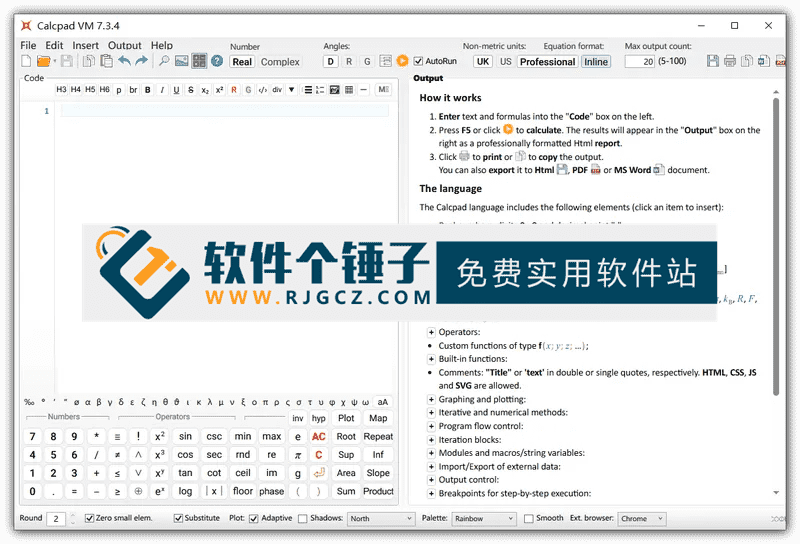
Calcpadis acompletely open-source mathematical calculation tool, its capabilities go beyond simple addition, subtraction, multiplication, and division, itsupports various complex mathematical calculations and engineering calculations. This toolprovides a very rich mathematical function library, includingnumerical methods, matrix operations, vector operationsand other advanced features. More interestingly,Calcpad also supports Markdown syntax, which means youcan use Markdown to format your text descriptions in the comments of the calculation process. In addition, it has an engineer-friendly feature—supports calculations with physical units, youcan directly write units in mathematical expressions, such as meters, seconds, newtons, and it will automatically handle and convert them for you.
\ \
Editor's summary: A powerful and easy-to-use professional calculation partner
\ \Overall,Calcpad is a powerful yet easy-to-use mathematical calculation tool,suitable for those who need to perform complex mathematical and engineering calculations, such as engineers, researchers, or students.It provides an efficient and convenient solution through rich built-in features and flexible customization options.
\ \Detailed Core Features
\ \1. Comprehensive mathematical and engineering calculation capabilities
\ \The softwaresupports various advanced mathematical operationsincluding but not limited tovarious numerical methods, matrix operations, and vector operations. ItsIts mathematical function library is very richprovidingGamma function, Error functionand other professional functions. For more complex problems, it alsosupports conditional execution and loop structures, letting youwrite complex calculation scriptsAt the same time, it has built-innumerical integration and equation solvingfeatures that canhelp users solve many complex mathematical problemsand also providesvarious numerical methods, for exampleroot finding, finding minimum and maximum valuesetc.
\ \2. Unique document and unit support
\ \This is a major highlight of Calcpad, itsupports using Markdown syntax. Youcan directly use Markdown in code comments or documentation to format textmaking calculation documents clearer and easier to read. Another killer feature issupport for calculations with physical units, youcan directly embed units in expressions(like `5 m / 2 s`), the software will automatically handle unit conversion and consistency checking, which is very convenient for engineering calculations.
\ \3. User-friendly interface and open-source status
\ \The software features aUser-friendly interfacea user-friendly interface, allowing you to input various types and see the results. Itmainly supports Windows 10 and 11 operating systemsOfficial guide also provides quick startprovides very detailed usage instructionsMost importantly, Calcpad is aopen-source softwarewhich meansanyone can view its source code, and even join in the open-source development and contributemaking it even better together.
\ \Summary
\ \Calcpadis a standout in the professional computing fieldopen-source desktop applicationIt excels incomputing power, document readability, and engineering practicalityachieving a good balance between them. Itspowerful math corecovers everything from basic arithmetic to advanced numerical analysis, andits native support for Markdownrevolutionizes the way computing notes are written, making the computing experience a clear way to record and present technical documentation.Physical unit computing featuredirectly solves pain points in engineering and scientific computing, avoiding tedious manual unit conversion and improving accuracy and convenience. As open-source software, it not onlyprovides highly transparent design and a stable systembut also allows reliable community-driven contributions. Forengineers, researchers, teachers, and engineering studentsspeaking,Calcpadis not just a calculator, but alightweight work platform capable of full computing, document writing, and result verificationespecially suitable for tasks that require heavy repetition, traceability, or complex logic, making it an excellent choice to replace traditional calculation software or scripts.
\ \ \ \Related Courses

Super local toolbox! Built-in screen recording, audio/video cutting & merging, video compression & extraction, forever free - Kedou Video Converter

100% perfect free tool! One-stop multi-function PDF software: PDF convert, compress, edit etc., minimal, no ads, so nice - JOPDF

Open-Source Desktop Remote Tool, Beats Paid Versions! Free for Personal and Commercial Use Unlimited, Cross-Platform, HopToDesk Remote Control

Latest K-12 Textbook Downloader: Whole-Grade Resource Download, Courseware, Video, Audio in One Click

HuyanBao: free blue-light eye-care app with pet break reminders

Windows Can Have a Desktop Dynamic Island Too! A Modern System Control Center — Give Your PC a Black Notch, PyIsland

3D Simulated Comic Drama Production: Seedance2.0 Full-Process Practical Course - From Zero to One High-Quality Comic Drama Creation

Win/Mac Dual Support! Latest Permanent Lifetime Version, Supports Old Photo Restoration, Image Sharpening and Lossless Upscaling Tool, Aiarty Image Enhancer

Online Video Course: Github Open-Source Bilibili Video Download Tool! Supports 8K and Dolby Vision Bilibili Video Batch Download Tool, Easy to Use Bilidown


