


-
Solo Business Courses
-
 Others
-
Overseas Tutorials
-
Photography & Editing
-
Community & Private Domain
-
Self-Media Writing & Copywriting
-
Side Income Projects
-
E-commerce
-
Short Video & Live Streaming
-
Artificial Intelligence (AI)
-
Software & Tools
-
Operating Systems
-
Plugins & Scripts
-
MacOS Software
-
Android Software
-
Windows Software
Video Frame Extractor & High-Fidelity Screenshot Tool — Frammer v1.0.5 (English)
-
Game Gold-Farming Money-Making Plan: Earn 1k+ Daily, a Stable 3-Year Project Anyone Can Do in Spare Time [Revealed]
Study material — included with membership Get Membership -
Hot-game fully-automated earning: 500+ a day, no experience, simple operation - the steadiest long-term game-earning side hustle (revealed)
Study material — included with membership Get Membership -
FlyingMouse earns merit this time! Don't panic at Windows format problems — the open-source FlyingMouse format conversion tool helps, a popular GitHub gem
Study material — included with membership Get Membership -
Douyin Product-Selling Coaching Bootcamp: No On-Camera Appearance Needed, Newbies Can Produce Selling Short Videos by Following the Steps
Study material — included with membership Get Membership -
First-release game gold-farming money plan: 1K+ a day, ordinary people in spare time
Study material — included with membership Get Membership






-
FlyingMouse earns merit this time! Don't panic at Windows format problems — the open-source FlyingMouse format conversion tool helps, a popular GitHub gem
Study material — included with membership Get Membership -
LuDaShi v6.1024.4105.1121 Slim Single File
Study material — included with membership Get Membership -
2D Cartoon Animation Software Moho Pro v14.3
Study material — included with membership Get Membership -
Video Editor Aiseesoft Filmai v1.0.18
Study material — included with membership Get Membership -
To-Do Microsoft To Do v2.147 Free
Study material — included with membership Get Membership -
PR/AE/DaVinci/FCPX video Plugin Nobe OmniScope Win1.11.15 / Mac1.10.138
Study material — included with membership Get Membership





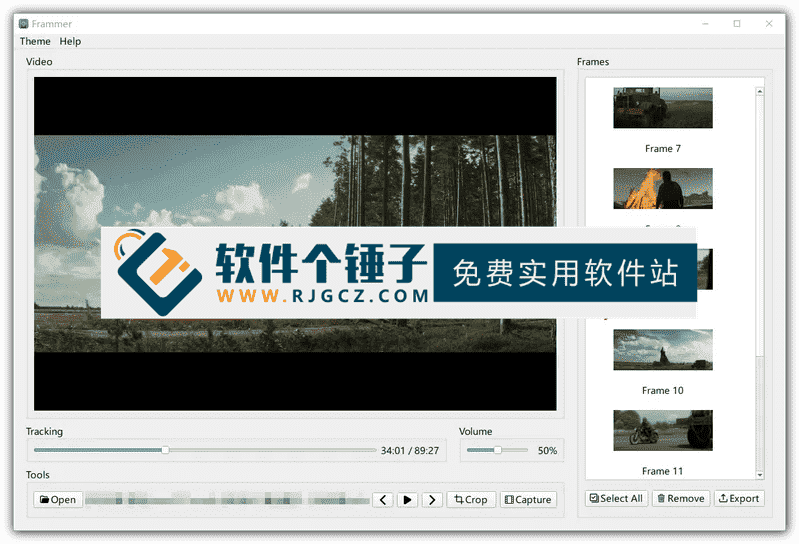
Frammer is a minimalist yet powerful video frame extractor for filmmakers, animators, creators and anyone capturing key frames as high-res stills.
\ \
Meeting professional user needs
\ \For professionals searching 'frame-by-frame video capture', 'portable 4K/HDR lossless frame extractor' or 'free single-frame PNG/TIFF export', it offers an offline, local, zero-compression-loss solution.
\ \Wide format support
\ \It supports mainstream codecs like H.264/H.265/ProRes/AV1, smoothly handling 4K/8K, high-frame-rate (240fps) and HDR10/Dolby Vision video, and exports JPEG, PNG (with alpha) and print-grade TIFF at original resolution — ensuring each frame suits storyboards, poster design, academic analysis or digital art.
\ \Touch-optimized workflow
\ \It uses a touch-optimized single-screen flow: video list → fullscreen → gesture-precise seek → one-tap capture.
\ \Precise frame control features
\ \Supports half/full-speed forward/backward frame-by-frame scrubbing, timecode display (e.g. 00:12.47), a frame counter (Frame 1247/3000), and lets you crop, rotate, scale and lock aspect ratios (e.g. 16:9, 1:1, 4:5) before saving frames.
\ \Professional work modes
\ \Its 'reference mode' supports split-screen preview plus note overlays, helping directors analyze shot language; 'batch export' saves many frames as a numbered sequence (frame_0001.png), greatly speeding work.
\ \Security and privacy protection
\ \All processing is done locally on the device, with no internet connection, no video uploads and no cloud dependency, ensuring the security of your materials.
\ \Efficient tool philosophy
\ \Versus blurry VLC captures or Premiere's tedious export, Frammer, with its 'precision through simplicity' philosophy, is a truly efficient frame-extraction tool.
\ \Main Features
\ \1. Pixel-level precise frame capture
\ \Supports frame-by-frame forward/backward, positioning error ≤1 frame.
\ \2. Full-format high-fidelity output
\ \JPEG/PNG/TIFF, preserving HDR metadata and native resolution.
\ \3. Professional-grade video compatibility
\ \4K/8K, 240fps, ProRes, AV1, Dolby Vision all supported.
\ \4. Frame editing features
\ \Crop, rotate, scale, lock aspect ratio (including Instagram size).
\ \5. Batch export
\ \Save multiple frames from a video sequence, ideal for extracting key frames from videos.
\ \6. Reference mode workflow support
\ \Split-screen preview + note overlay, suitable for storyboard production.
\ \7. Fully offline operation
\ \Local processing, no internet required, worry-free privacy.
\ \Who is this software for?
\ \Frammer suits filmmakers, animators, content creators, researchers, and anyone extracting high-quality stills from video. Whether making storyboards, analyzing cinematography or creating digital art, it gives professional support.
\ \Example use cases
\ \E.g. pull keyframes from films for storyboards, capture animation frames for analysis, grab sports highlights, frame academic footage, or get HD wallpaper from 4K video.
\ \Operation
\ \It uses a touch-optimized single-screen workflow that's simple. Precise gesture targeting and one-tap capture make frame extraction fast.
\ \Precise control system advantages
\ \Supports frame-by-frame forward and backward stepping with a positioning error of no more than 1 frame, ensuring accurate capture of target frames. Timecode and frame counter display let users precisely locate the needed frame.
\ \Format compatibility
\ \It supports pro video formats — 4K/8K, high-frame-rate and HDR — meeting pros' varied needs.
\ \Editing features and value
\ \Crop, rotate and scale frames before saving; aspect-lock suits social posting, so extracted frames are ready to use.
\ \Batch processing efficiency
\ \Batch export saves many frames as a numbered sequence, greatly speeding work for those extracting many frames.
\ \Privacy and security guarantee
\ \Running fully offline protects your footage, suiting commercial or sensitive content — no risk of uploading material.
\ \Usage Tips
\ \Get used to frame-by-frame browsing and use timecodes to locate shots. When batch-exporting, mind naming rules for later organizing. Reference mode helps analyze framing.
\ \Professional value
\ \In filmmaking, animation and research, precise frame extraction is fundamental. Frammer provides a pro-level solution, making it faster and more accurate.
\ \Creative value
\ \Frames extracted from video become creative assets for posters, digital art and social content, giving creators a rich source of material.
\ \Finally, to sum up
\ \Frammer is a professional video frame-extraction tool that combines precise control, broad format support and efficient workflow. A simple UI, powerful features and safe local processing make it ideal for frame extraction. Both film professionals and everyday creators get a satisfying experience.
\ \ \ \Related Courses

Super local toolbox! Built-in screen recording, audio/video cutting & merging, video compression & extraction, forever free - Kedou Video Converter

100% perfect free tool! One-stop multi-function PDF software: PDF convert, compress, edit etc., minimal, no ads, so nice - JOPDF

Open-Source Desktop Remote Tool, Beats Paid Versions! Free for Personal and Commercial Use Unlimited, Cross-Platform, HopToDesk Remote Control

Latest K-12 Textbook Downloader: Whole-Grade Resource Download, Courseware, Video, Audio in One Click

HuyanBao: free blue-light eye-care app with pet break reminders

Windows Can Have a Desktop Dynamic Island Too! A Modern System Control Center — Give Your PC a Black Notch, PyIsland

3D Simulated Comic Drama Production: Seedance2.0 Full-Process Practical Course - From Zero to One High-Quality Comic Drama Creation

Win/Mac Dual Support! Latest Permanent Lifetime Version, Supports Old Photo Restoration, Image Sharpening and Lossless Upscaling Tool, Aiarty Image Enhancer

Online Video Course: Github Open-Source Bilibili Video Download Tool! Supports 8K and Dolby Vision Bilibili Video Batch Download Tool, Easy to Use Bilidown


