


-
Solo Business Courses
-
 Others
-
Overseas Tutorials
-
Photography & Editing
-
Community & Private Domain
-
Self-Media Writing & Copywriting
-
Side Income Projects
-
E-commerce
-
Short Video & Live Streaming
-
Artificial Intelligence (AI)
-
Software & Tools
-
Operating Systems
-
Plugins & Scripts
-
MacOS Software
-
Android Software
-
Windows Software
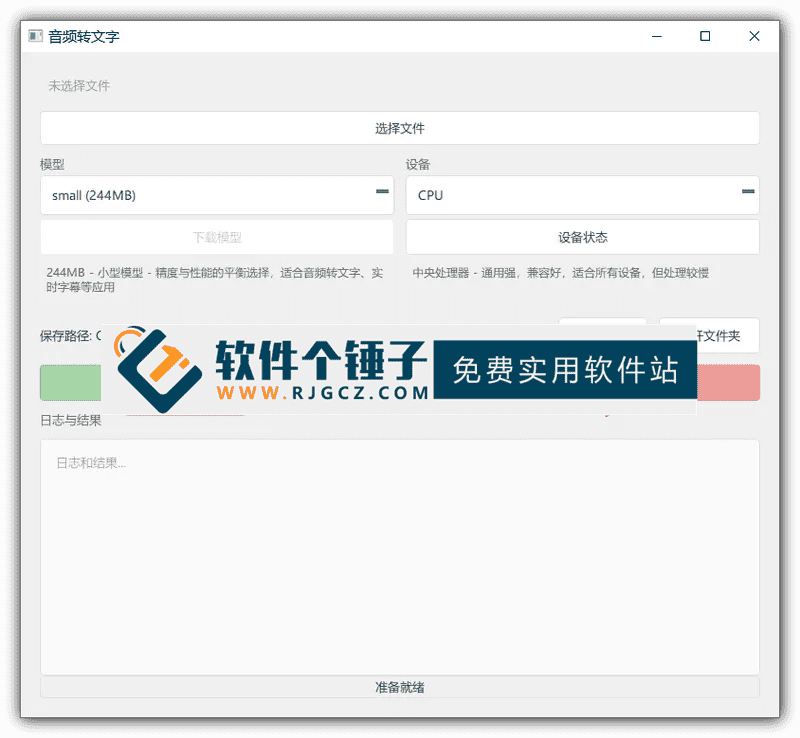
AI Speech Recognition Software AI Speech-to-Text v1.0 Supports One-Click SRT Subtitle Generation [Software Gechuzi·R4744]
-
Game Gold-Farming Money-Making Plan: Earn 1k+ Daily, a Stable 3-Year Project Anyone Can Do in Spare Time [Revealed]
Study material — included with membership Get Membership -
Hot-game fully-automated earning: 500+ a day, no experience, simple operation - the steadiest long-term game-earning side hustle (revealed)
Study material — included with membership Get Membership -
FlyingMouse earns merit this time! Don't panic at Windows format problems — the open-source FlyingMouse format conversion tool helps, a popular GitHub gem
Study material — included with membership Get Membership -
Douyin Product-Selling Coaching Bootcamp: No On-Camera Appearance Needed, Newbies Can Produce Selling Short Videos by Following the Steps
Study material — included with membership Get Membership -
First-release game gold-farming money plan: 1K+ a day, ordinary people in spare time
Study material — included with membership Get Membership






-
FlyingMouse earns merit this time! Don't panic at Windows format problems — the open-source FlyingMouse format conversion tool helps, a popular GitHub gem
Study material — included with membership Get Membership -
LuDaShi v6.1024.4105.1121 Slim Single File
Study material — included with membership Get Membership -
2D Cartoon Animation Software Moho Pro v14.3
Study material — included with membership Get Membership -
Video Editor Aiseesoft Filmai v1.0.18
Study material — included with membership Get Membership -
To-Do Microsoft To Do v2.147 Free
Study material — included with membership Get Membership -
PR/AE/DaVinci/FCPX video Plugin Nobe OmniScope Win1.11.15 / Mac1.10.138
Study material — included with membership Get Membership





AI Speech-to-Text Tool v1.0 is a localized speech-to-text software developed based on OpenAI's open-source Whisper model, specifically designed for users who need offline work, pursue high accuracy, and require speech recognition. If you often search for "local speech-to-subtitle tools that support Chinese," "free Whisper GUI software that doesn't need internet," or "speech recognition tools that can batch process MP3 to SRT on Win10," then it provides exactly the perfect solution for you—no network connection required, no need to upload any audio files, and all processing is done on your own computer. Whether organizing meeting recordings, adding subtitles to online course videos, or transcribing interview materials, users can quickly obtain accurate transcripts with absolutely no risk of privacy leakage. Compared to online services that require uploading sensitive audio, or command-line tools that are not very user-friendly for ordinary users, this software greatly lowers the threshold for using AI speech recognition with its "one-click operation + full Chinese interface + zero-configuration startup" features.
\ \
How does it adapt to different computers and needs?
\ \This software integrates four different sizes of Whisper models internally: tiny, base, small, and medium. Users can flexibly choose according to their computer's performance. For example, a lower-spec laptop can choose the tiny model for second-level response; while a powerful desktop can enable the medium model for the highest recognition accuracy. It supports automatically extracting speech from common audio and video files such as MP4, MOV, MP3, and WAV, and outputs SRT subtitle files with precise timelines, or plain text TXT documents. These files can be directly imported into video editing software such as CapCut and Premiere for use. It is suitable for teachers making subtitles for teaching videos, self-media creators generating video copy, journalists organizing interview records, or students converting lecture recordings into text notes. Most importantly, all processing is done locally, with no network requests, no account registration required, and no retention of any of your data, truly fulfilling the privacy promise of "your voice belongs only to you."
\ \Full analysis of core feature highlights
\ \- \
\
- Completely local offline operation: The entire speech recognition process is carried out in an offline environment, and audio files are never uploaded to any server, fundamentally guaranteeing your privacy and security. \ \
- Integrated official Whisper model: It supports tiny, base, small and medium model sizes, suiting low- to high-spec PCs. \ \
- Automatically generate SRT subtitle files: Capable of outputting standard SRT subtitle files with precise timelines, which can be directly used in various video editing software. \ \
- Supports common audio and video formats: Can automatically extract audio from files in common formats such as MP3, WAV, MP4, and MOV for recognition. \ \
- Optimized for Chinese recognition: Specially adjusted and optimized for common speech scenarios, with significantly higher accuracy than general models in Chinese speech recognition. \ \
- Friendly graphical interface: Provides an intuitive graphical operation interface, no need to learn complex command lines, and speech-to-text can be completed in just 3 steps. \ \
- Efficient batch processing capability: Supports continuously adding multiple files, and the software will automatically execute them in sequence in the background, saving repetitive operations. \ \
- Completely free and more: Software, no ads, no subscription payment, no watermark, and no feature limitations. \ \
Who is it most suitable for?
\ \If you are one of the following audiences, then this type of tool may become your powerful assistant:
\ \- \
\
- Content creators and self-media people: Need to quickly generate subtitles or copy for videos. \ \
- Educators and students: Need to convert course recordings and lecture content into text notes or subtitles. \ \
- Journalists and researchers: Need to efficiently and accurately organize interview recordings or interview materials. \ \
- Users with high privacy and security requirements: Do not want your meeting recordings or private audio uploaded to the cloud. \ \
- Ordinary computer users unfamiliar with command lines: Hope to have a simple and easy-to-use graphical interface to use the powerful Whisper model. \ \
Simple summary
\ \In short, AI Speech-to-Text v1.0 'packages' the top Whisper model into an extremely user-friendly Windows app. It solves online-service privacy concerns and command-line hurdles, letting you enjoy high-accuracy multilingual recognition while keeping your data under your control. Whether for productivity or privacy, it's a practical tool worth trying.
\ \ \ \Related Courses

Super local toolbox! Built-in screen recording, audio/video cutting & merging, video compression & extraction, forever free - Kedou Video Converter

100% perfect free tool! One-stop multi-function PDF software: PDF convert, compress, edit etc., minimal, no ads, so nice - JOPDF

Open-Source Desktop Remote Tool, Beats Paid Versions! Free for Personal and Commercial Use Unlimited, Cross-Platform, HopToDesk Remote Control

Latest K-12 Textbook Downloader: Whole-Grade Resource Download, Courseware, Video, Audio in One Click

HuyanBao: free blue-light eye-care app with pet break reminders

Windows Can Have a Desktop Dynamic Island Too! A Modern System Control Center — Give Your PC a Black Notch, PyIsland

3D Simulated Comic Drama Production: Seedance2.0 Full-Process Practical Course - From Zero to One High-Quality Comic Drama Creation

Win/Mac Dual Support! Latest Permanent Lifetime Version, Supports Old Photo Restoration, Image Sharpening and Lossless Upscaling Tool, Aiarty Image Enhancer

Online Video Course: Github Open-Source Bilibili Video Download Tool! Supports 8K and Dolby Vision Bilibili Video Batch Download Tool, Easy to Use Bilidown


