


-
Solo Business Courses
-
 Others
-
Overseas Tutorials
-
Photography & Editing
-
Community & Private Domain
-
Self-Media Writing & Copywriting
-
Side Income Projects
-
E-commerce
-
Short Video & Live Streaming
-
Artificial Intelligence (AI)
-
Software & Tools
-
Operating Systems
-
Plugins & Scripts
-
MacOS Software
-
Android Software
-
Windows Software
Windows Optimizer/Security Tool — WKTools v1.0.0.21
-
Game Gold-Farming Money-Making Plan: Earn 1k+ Daily, a Stable 3-Year Project Anyone Can Do in Spare Time [Revealed]
Study material — included with membership Get Membership -
Hot-game fully-automated earning: 500+ a day, no experience, simple operation - the steadiest long-term game-earning side hustle (revealed)
Study material — included with membership Get Membership -
FlyingMouse earns merit this time! Don't panic at Windows format problems — the open-source FlyingMouse format conversion tool helps, a popular GitHub gem
Study material — included with membership Get Membership -
Douyin Product-Selling Coaching Bootcamp: No On-Camera Appearance Needed, Newbies Can Produce Selling Short Videos by Following the Steps
Study material — included with membership Get Membership -
First-release game gold-farming money plan: 1K+ a day, ordinary people in spare time
Study material — included with membership Get Membership






-
FlyingMouse earns merit this time! Don't panic at Windows format problems — the open-source FlyingMouse format conversion tool helps, a popular GitHub gem
Study material — included with membership Get Membership -
LuDaShi v6.1024.4105.1121 Slim Single File
Study material — included with membership Get Membership -
2D Cartoon Animation Software Moho Pro v14.3
Study material — included with membership Get Membership -
Video Editor Aiseesoft Filmai v1.0.18
Study material — included with membership Get Membership -
To-Do Microsoft To Do v2.147 Free
Study material — included with membership Get Membership -
PR/AE/DaVinci/FCPX video Plugin Nobe OmniScope Win1.11.15 / Mac1.10.138
Study material — included with membership Get Membership





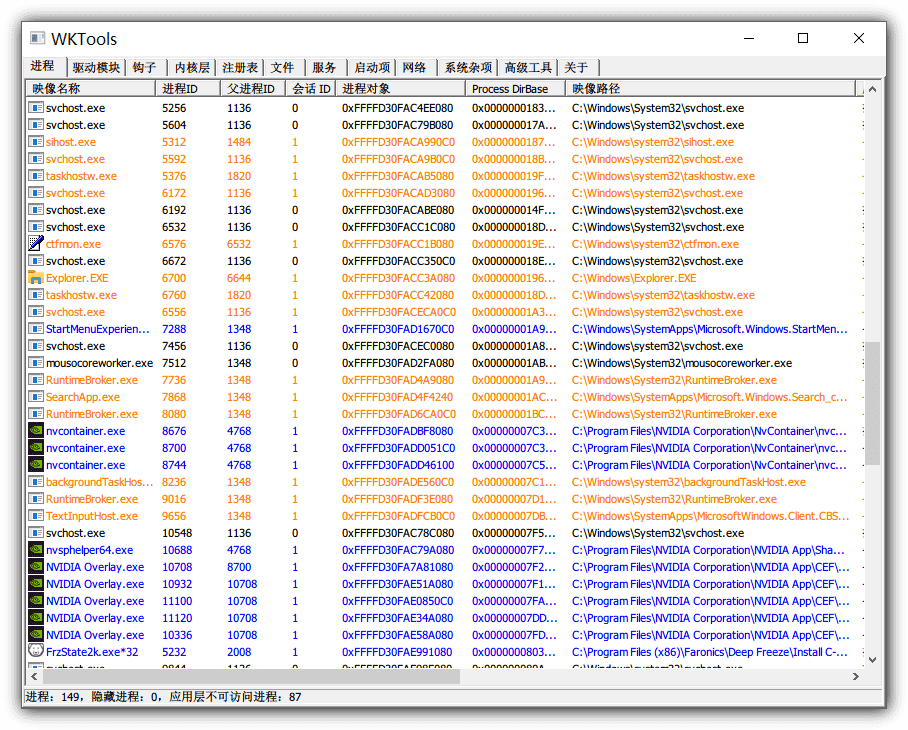
WKTools is an open-source kernel-level Windows optimization and security toolkit by developer WKILLER, built for technical users who need deep resource management, faster performance and stronger security. If you've struggled to thoroughly clean system junk and disable useless startup items to speed boot, it offers a no-install, open-and-run solution. It brings together system cleanup, performance tuning, fault diagnosis, security and resource monitoring in one interface for centralized, fine control of Windows core components — ideal for speeding up old PCs and purifying the system. Versus traditional optimizers with scattered features or bundled promos, WKTools uses a lightweight portable architecture calling low-level system APIs directly, avoiding middle-layer overhead and meeting the need for 'one tool for all system maintenance.'
\ \
1. Solving advanced system management challenges
\ \Many users want an advanced system tool that force-deletes locked files and lists hidden processes to tackle virus leftovers or failed uninstalls. WKTools has a kernel-level process engine that breaches normal permission barriers, deep-scanning and terminating protected or hidden processes; combined with its file/service manager, it force-releases locked files, deletes stubborn registry keys and disables suspicious services for deep cleanup. Asked which optimizer truly reaches the kernel to manage drivers and services? The answer is its low-level access to the Windows NT architecture — you can list all loaded drivers, identify and disable non-essential ones (legacy audio drivers, virtual devices), cut resource contention and keep the system fast and stable. Ideal for pre-reinstall tuning, adware cleanup, error repair, or building a trusted office environment.
\ \2. Comprehensive feature set
\ \This tool provides a comprehensive feature set:
\ \- \
\
- Supports one-click cleanup of temporary files, system logs, various caches, and invalid registry entries. \ \
- Can optimize startup items, service configurations, network stack, and hardware performance. \ \
- Can deeply erase browser history, cookies, and download records to protect your privacy. \ \
- Can scan for system vulnerabilities and suspicious entries to prevent security threats. \ \
- Can monitor CPU, memory, disk, and network usage in real time to help you analyze performance. \ \
- Built-in registry editor supports secure modification and backup/restore. \ \
Its UI is clean and intuitive, logic clear, modules well-categorized, lowering the barrier to advanced use.
\ \3. Detailed feature overview
\ \1. Powerful system cleanup
Can clean system junk files, invalid registry entries, and redundant folders, etc.
2. Comprehensive system optimization
Can optimize system startup items, services, and hard drives, etc., improving system speed and overall performance.
3. Detailed system diagnostics
Can diagnose hard drive, system, and network issues, etc., giving you a clear view of your computer's condition.
4. Thoughtful privacy protection
\
It clears browser history, cache and cookies to protect your privacy.
5. Reliable security protection
Can scan for system vulnerabilities and Trojans, etc., ensuring your system security.
4. Open-source, Free & Summary
\ \WKTools is completely free and open-source (code on GitHub) — unzip and run, with no background processes and no system-config changes (unless you do it yourself), and all data is processed locally for privacy and safety. It supports Windows 7 through 11 with extremely low resource use, running smoothly even on low-spec devices. Its positioning as an 'all-in-one open-source system-maintenance toolkit' fills the gap between basic cleaners and pro PE toolkits — ideal for IT ops staff, tech enthusiasts and system-focused users.
\ \Overall, WKTools' core edge is 'kernel-level permissions + high integration', turning complex system management into intuitive operations. It's a key component for your personal all-in-one Windows performance and security setup.
\ \ \ \Related Courses

Super local toolbox! Built-in screen recording, audio/video cutting & merging, video compression & extraction, forever free - Kedou Video Converter

100% perfect free tool! One-stop multi-function PDF software: PDF convert, compress, edit etc., minimal, no ads, so nice - JOPDF

Open-Source Desktop Remote Tool, Beats Paid Versions! Free for Personal and Commercial Use Unlimited, Cross-Platform, HopToDesk Remote Control

Latest K-12 Textbook Downloader: Whole-Grade Resource Download, Courseware, Video, Audio in One Click

HuyanBao: free blue-light eye-care app with pet break reminders

Windows Can Have a Desktop Dynamic Island Too! A Modern System Control Center — Give Your PC a Black Notch, PyIsland

3D Simulated Comic Drama Production: Seedance2.0 Full-Process Practical Course - From Zero to One High-Quality Comic Drama Creation

Win/Mac Dual Support! Latest Permanent Lifetime Version, Supports Old Photo Restoration, Image Sharpening and Lossless Upscaling Tool, Aiarty Image Enhancer

Online Video Course: Github Open-Source Bilibili Video Download Tool! Supports 8K and Dolby Vision Bilibili Video Batch Download Tool, Easy to Use Bilidown


