


-
Solo Business Courses
-
 Others
-
Overseas Tutorials
-
Photography & Editing
-
Community & Private Domain
-
Self-Media Writing & Copywriting
-
Side Income Projects
-
E-commerce
-
Short Video & Live Streaming
-
Artificial Intelligence (AI)
-
Software & Tools
-
Operating Systems
-
Plugins & Scripts
-
MacOS Software
-
Android Software
-
Windows Software
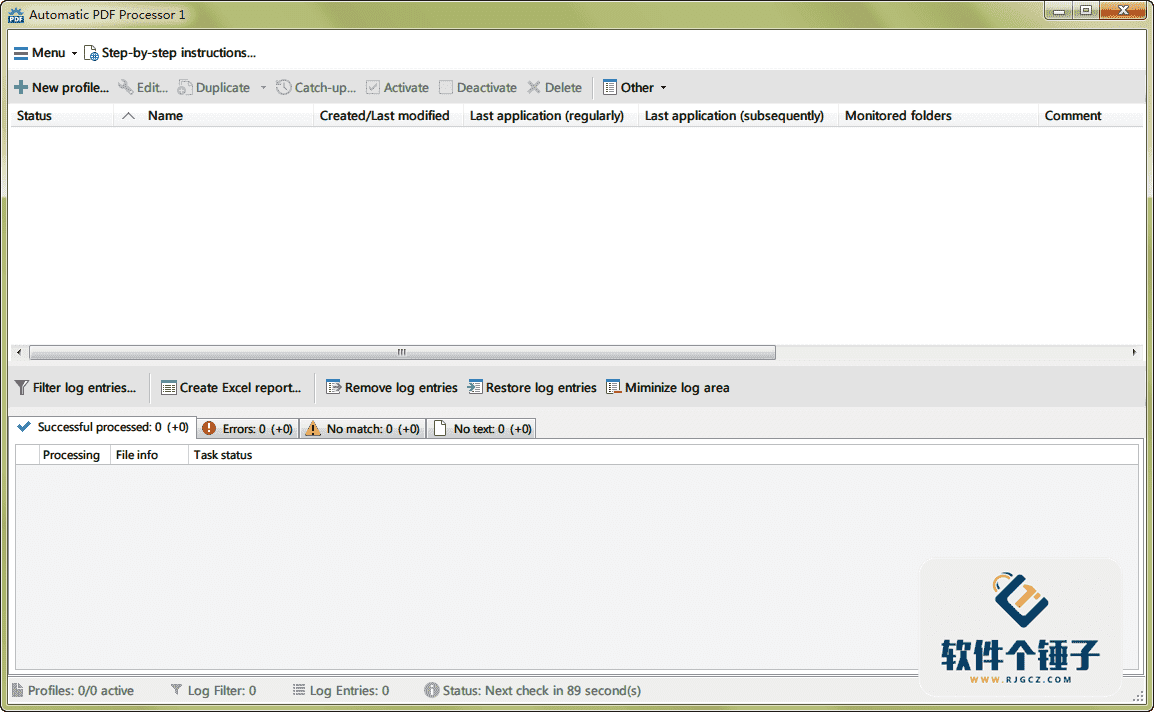
Automatic PDF Processor v2.0 English Edition【Software Ge Chuizi·R4789】
-
Game Gold-Farming Money-Making Plan: Earn 1k+ Daily, a Stable 3-Year Project Anyone Can Do in Spare Time [Revealed]
Study material — included with membership Get Membership -
Hot-game fully-automated earning: 500+ a day, no experience, simple operation - the steadiest long-term game-earning side hustle (revealed)
Study material — included with membership Get Membership -
FlyingMouse earns merit this time! Don't panic at Windows format problems — the open-source FlyingMouse format conversion tool helps, a popular GitHub gem
Study material — included with membership Get Membership -
Douyin Product-Selling Coaching Bootcamp: No On-Camera Appearance Needed, Newbies Can Produce Selling Short Videos by Following the Steps
Study material — included with membership Get Membership -
First-release game gold-farming money plan: 1K+ a day, ordinary people in spare time
Study material — included with membership Get Membership






-
FlyingMouse earns merit this time! Don't panic at Windows format problems — the open-source FlyingMouse format conversion tool helps, a popular GitHub gem
Study material — included with membership Get Membership -
LuDaShi v6.1024.4105.1121 Slim Single File
Study material — included with membership Get Membership -
2D Cartoon Animation Software Moho Pro v14.3
Study material — included with membership Get Membership -
Video Editor Aiseesoft Filmai v1.0.18
Study material — included with membership Get Membership -
To-Do Microsoft To Do v2.147 Free
Study material — included with membership Get Membership -
PR/AE/DaVinci/FCPX video Plugin Nobe OmniScope Win1.11.15 / Mac1.10.138
Study material — included with membership Get Membership





Simply put, Automatic PDF Processor is a tireless PDF butler. It auto-monitors any number of folders you specify (often called 'hot folders'). Once a new PDF lands in a monitored folder, it automatically runs a series of actions per your rules — auto-print, auto-rename, or move the file into a dynamically named folder.
\ \Beyond file content, it intelligently uses PDF metadata. E.g., you can include invoice number, date and other key info in generated file paths. To precisely control processing scope, use file-based filters whose conditions can include document text, PDF metadata and regular file info.
\ \
Core Data Processing Capabilities
\ \This software performs exceptionally well in data extraction.
\ \1. Flexible Text Data Extraction
\ \Extracting specific data from PDF text is an optional yet powerful feature. You create unlimited extraction rules in the config. After optional validation and formatting, extracted data can name folders/files, or be saved separately as CSV data files for later analysis or database import.
\ \2. Automatic Extraction of PDF Attachments
\ \It also auto-runs another useful task: extracting embedded attachments from PDFs. E.g., ZUGFeRD XML files, XRechnung attachments stored as part of a PDF invoice, auto-extracted and saved to the same folder or another location.
\ \Full Feature Breakdown
\ \Let's take a detailed look at what it can automatically do for you:
\ \1. Comprehensive Automated Processing
\ \It automates PDFs end to end: auto-print, rename, move, copy, save attachments inside PDFs, and save extracted text summaries.
\ \2. Smart "Hot Folder" Monitoring
\ \It can monitor any number of folders simultaneously; once a PDF file enters, the preset processing workflow is triggered immediately.
\ \3. Powerful Rules and Filtering System
\ \Create separate rules for different tasks. Filter by document text, file date, attachment name/count, title etc., so only matching files are processed.
\ \4. Dynamically Created Storage Paths
\ \Storage location isn't fixed. It dynamically creates folders and subfolders based on PDF metadata or extracted content — truly smart archiving.
\ \5. Comprehensive Notification and Scheduling System
\ \You can receive email notifications of file-processing status. You can also restrict automated tasks to certain dates and times, e.g. auto-print only during office hours.
\ \6. Seamless Workflow and Batch Processing
\ \It seamlessly combines scanning and OCR with subsequent auto-email and auto-naming, forming a complete automation pipeline. It can also process all existing PDFs in a folder matching your conditions, easily solving historical-document archiving.
\ \7. Continuous Operations and Smart Scheduling
\ \It supports triggering follow-up actions after the main operation — e.g., passing the saved PDF's or its attachment's path as a parameter to auto-launch another app. It can also auto-sort PDFs or move them into another folder structure created dynamically from file attributes.
\ \Summary
\ \In short, Automatic PDF Processor is a professional tool for enterprise and high-efficiency office work. Through highly customizable automation rules, it frees users from repetitive PDF chores — printing, renaming, sorting, data extraction. Its core value is standardizing, structuring and automating PDF workflows, ideal for finance, admin and legal departments handling large numbers of invoices, reports and scans. If you want to boost PDF management efficiency and accuracy, this automated processor is a strong candidate.
\ \ \ \Related Courses

Super local toolbox! Built-in screen recording, audio/video cutting & merging, video compression & extraction, forever free - Kedou Video Converter

100% perfect free tool! One-stop multi-function PDF software: PDF convert, compress, edit etc., minimal, no ads, so nice - JOPDF

Open-Source Desktop Remote Tool, Beats Paid Versions! Free for Personal and Commercial Use Unlimited, Cross-Platform, HopToDesk Remote Control

Latest K-12 Textbook Downloader: Whole-Grade Resource Download, Courseware, Video, Audio in One Click

HuyanBao: free blue-light eye-care app with pet break reminders

Windows Can Have a Desktop Dynamic Island Too! A Modern System Control Center — Give Your PC a Black Notch, PyIsland

3D Simulated Comic Drama Production: Seedance2.0 Full-Process Practical Course - From Zero to One High-Quality Comic Drama Creation

Win/Mac Dual Support! Latest Permanent Lifetime Version, Supports Old Photo Restoration, Image Sharpening and Lossless Upscaling Tool, Aiarty Image Enhancer

Online Video Course: Github Open-Source Bilibili Video Download Tool! Supports 8K and Dolby Vision Bilibili Video Batch Download Tool, Easy to Use Bilidown


