


-
Solo Business Courses
-
 Others
-
Overseas Tutorials
-
Photography & Editing
-
Community & Private Domain
-
Self-Media Writing & Copywriting
-
Side Income Projects
-
E-commerce
-
Short Video & Live Streaming
-
Artificial Intelligence (AI)
-
Software & Tools
-
Operating Systems
-
Plugins & Scripts
-
MacOS Software
-
Android Software
-
Windows Software
WorkBuddy agent building practical tutorial
-
Game Gold-Farming Money-Making Plan: Earn 1k+ Daily, a Stable 3-Year Project Anyone Can Do in Spare Time [Revealed]
Study material — included with membership Get Membership -
Hot-game fully-automated earning: 500+ a day, no experience, simple operation - the steadiest long-term game-earning side hustle (revealed)
Study material — included with membership Get Membership -
FlyingMouse earns merit this time! Don't panic at Windows format problems — the open-source FlyingMouse format conversion tool helps, a popular GitHub gem
Study material — included with membership Get Membership -
Douyin Product-Selling Coaching Bootcamp: No On-Camera Appearance Needed, Newbies Can Produce Selling Short Videos by Following the Steps
Study material — included with membership Get Membership -
First-release game gold-farming money plan: 1K+ a day, ordinary people in spare time
Study material — included with membership Get Membership






-
FlyingMouse earns merit this time! Don't panic at Windows format problems — the open-source FlyingMouse format conversion tool helps, a popular GitHub gem
Study material — included with membership Get Membership -
LuDaShi v6.1024.4105.1121 Slim Single File
Study material — included with membership Get Membership -
2D Cartoon Animation Software Moho Pro v14.3
Study material — included with membership Get Membership -
Video Editor Aiseesoft Filmai v1.0.18
Study material — included with membership Get Membership -
To-Do Microsoft To Do v2.147 Free
Study material — included with membership Get Membership -
PR/AE/DaVinci/FCPX video Plugin Nobe OmniScope Win1.11.15 / Mac1.10.138
Study material — included with membership Get Membership





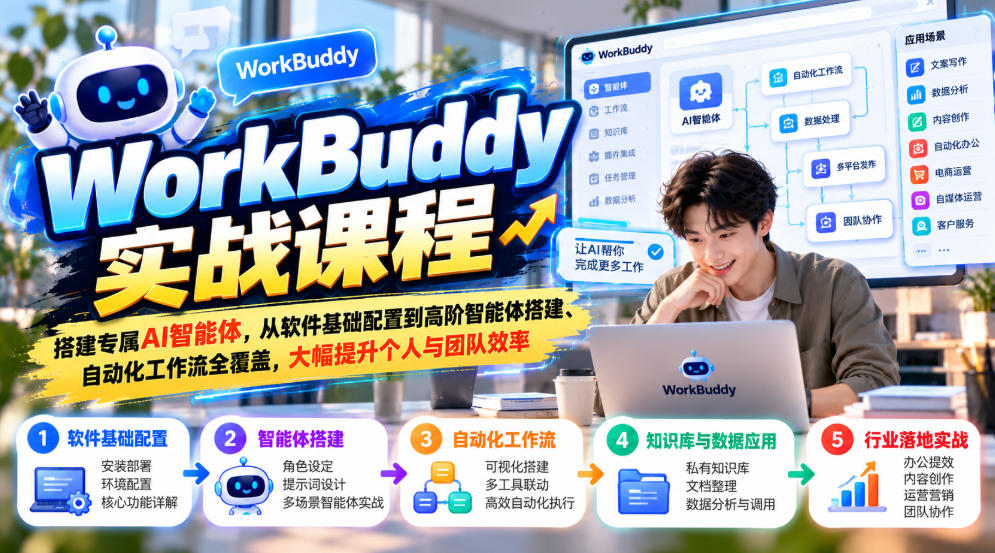
WorkBuddy agent implementation hands-on course
Office workers, self-media creators, operations and e-commerce practitioners, AI enthusiasts, small team leaders
Basic configuration, three operating modes, office automation, knowledge base setup, AI image generation and video editing, AI employees and work teams, custom skill encapsulation
Build your own AI agent from scratch, form reusable automated workflows, and improve personal and team efficiency
Course Introduction
The WorkBuddy Practical Course is a hands-on WorkBuddy agent implementation course that beginners can pick up, covering everything from basic software configuration to advanced agent building and automated workflows.
The course starts with the basics: installation and login, first-time configuration, a clear explanation of the essential differences between WorkBuddy and ordinary chat AI, the three capability boundaries, and the three operating modes (Ask/Think/Do); it teaches everyone to choose the right large model for the scenario and master the core precautions for the first task assignment.
Office scenario practice includes one-click generation of PPTs, long documents, and contract proposals, plus Excel data processing and analysis; it supports integration with mainstream office tools such as Feishu, Tencent Docs, email, and meetings, with step-by-step guidance to build a personal knowledge base, import scattered materials, use the knowledge base to write drafts, and maintain the knowledge base for automatic iteration.
The creative content section explains Skill encapsulation for image and video generation, one-click image output, and replication of e-commerce detail images; it breaks down viral short videos, creates nine-grid storyboards, automates batch editing into finished videos, automatically generates subtitles, and can also achieve automatic publishing of Xiaohongshu image-text secondary creations.
Advanced methods: batch organization and processing of computer files, building an independent AI employee, forming an AI work team, custom-encapsulating exclusive skills, with workstation debugging included, plus a case demonstration of one-click building of a coffee shop ordering system, bringing AI agents into real business scenarios.
The course starts from the most basic environment configuration and gradually transitions to office work, content production, and advanced agent orchestration. Learners can choose modules to practice as needed. It is recommended to first complete installation and configuration and become familiar with the three modes, then use real documents, spreadsheets, and materials to run through a small office task, and afterward try the knowledge base and content production modules. The course explains abstract capability boundaries, model selection, and task assignment methods in fairly concrete terms. Combined with workbench debugging and the order system case, it helps understand the boundaries and collaboration methods of agents in real business and reduces time spent on blind attempts.
Suitable For
- Office workers who want to use AI agents to reduce repetitive work such as reports, documents, and PPTs
- Self-media creators working on Xiaohongshu and short videos who need to batch-produce image-text posts and edit videos
- Operations and e-commerce practitioners who need to batch-create images, replicate detail materials, and create secondary content
- AI enthusiasts who want to learn agent configuration, build knowledge bases, and customize AI skills
- Small team leaders who want to build AI employees and AI work teams to achieve process automation
Student learning outcomes
- Skillfully master WorkBuddy installation and configuration, distinguish the three operating modes, learn to choose models reasonably, and avoid usage pitfalls
- Master office automation: one-click generation of PPTs, reports, and contracts, Excel data analysis, and integration with office ecosystems such as Feishu and Tencent Docs
- Build an exclusive personal knowledge base, import materials, produce documents based on the knowledge base, and learn to continuously maintain and update the knowledge base
- Master AI image generation, e-commerce detail image replication, short video breakdown, batch automatic editing, and automatic publishing of Xiaohongshu image-text posts
- Learn batch processing of computer files, custom skill encapsulation, build exclusive AI employees, and form AI work teams
- Understand agent implementation approaches and be able to combine them with your own business to build your own automated workflows
- 1.WorkBuddy installation, login, and first configuration
- 2.For the same question, what is the difference between asking a chat AI and handing it to WorkBuddy
- 3.The three boundaries of WorkBuddy: it cannot do everything
- 4.The three modes of WorkBuddy: ask/think/do
- 5.How to choose a WorkBuddy model
- 6.WorkBuddy's first task assignment: four major precautions
- 7.One-click PPT creation
- 8.One-click long document creation: reports/contracts/proposals
- 9.Excel data processing and analysis in practice
- 10.Connect your office tools: Tencent Docs/email/meetings
- 11.One-click Feishu integration
- 12.Build a personal knowledge base
- 13.Pour scattered materials into the knowledge base
- 14.Writing articles with the knowledge base: from materials to final draft
- 15.Let the knowledge base grow automatically: regular organization and updates
- 16.Package image and video generation Skills
- 17.One-click image generation
- 18.Replicate e-commerce product detail images
- 19.Replicate viral short videos: break down - produce - CapCut project (book list videos)
- 20.Create nine-grid storyboard short videos
- 21.Automated editing: batch final cuts and subtitles (videos of a historical figure's life)
- 22.Secondary creation and auto-publishing of Xiaohongshu image-text notes
- 23.Computer automation for organizing files and batch file processing
- 24.Build your own AI employee
- 25.Build your own AI work team
- 26.Package work methods into Skills
- 27.Workbench hands-on practice and debugging
- 28.One-click creation of a coffee shop ordering system
💡 Learning Tip:The course content is based on industry practices at the time of publication. It is recommended to combine your study with the latest platform rules.
Related Courses

Family Comedy Short-Drama Creation Course: Benchmark Hot Accounts, AI-Assisted, Fast Start for Total Beginners, Grow Followers and Drive Product Sales

Amazon AI Automation Practical Course: AI Operating Mindset, Setting Up the Codex Environment, Risk-Control Checks and Automated Listing Copy

AI E-Commerce Data Tool Development Course: Learn Codex+BI From Zero, Build a Multi-Store Integrated Visualization Dashboard


Advanced AI Prompt Application: 15 Lessons | Universal Instruction Thinking + Multiple Output Modes + Full Industry Commercial Cases

AI Video Creation Crash Course: From Great-Case Breakdown to Five Core Modules, Fast-Track AI Video Skills for Total Beginners

AI Commercial Practice System Course: In-Depth SD Mastery + Advanced Flux Hands-On + Comfyui Workflow Building, Full Commercial Design Project Training

[National-Day Pick] AI Automation Game, 1k+ RMB a Day, Simple to Operate, Stable for Three Years! [Revealed]



