


-
Solo Business Courses
-
 Others
-
Overseas Tutorials
-
Photography & Editing
-
Community & Private Domain
-
Self-Media Writing & Copywriting
-
Side Income Projects
-
E-commerce
-
Short Video & Live Streaming
-
Artificial Intelligence (AI)
-
Software & Tools
-
Operating Systems
-
Plugins & Scripts
-
MacOS Software
-
Android Software
-
Windows Software
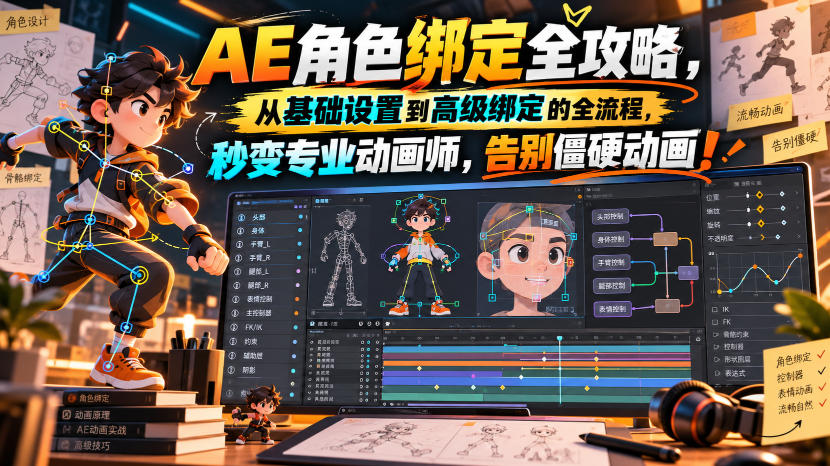
[No watermark] AE character rigging full guide, the full process from basic setup to advanced rigging, become a professional animator in seconds, say goodbye to stiff animation! [Original bilingual su
-
Game Gold-Farming Money-Making Plan: Earn 1k+ Daily, a Stable 3-Year Project Anyone Can Do in Spare Time [Revealed]
Study material — included with membership Get Membership -
Hot-game fully-automated earning: 500+ a day, no experience, simple operation - the steadiest long-term game-earning side hustle (revealed)
Study material — included with membership Get Membership -
FlyingMouse earns merit this time! Don't panic at Windows format problems — the open-source FlyingMouse format conversion tool helps, a popular GitHub gem
Study material — included with membership Get Membership -
Douyin Product-Selling Coaching Bootcamp: No On-Camera Appearance Needed, Newbies Can Produce Selling Short Videos by Following the Steps
Study material — included with membership Get Membership -
First-release game gold-farming money plan: 1K+ a day, ordinary people in spare time
Study material — included with membership Get Membership






-
FlyingMouse earns merit this time! Don't panic at Windows format problems — the open-source FlyingMouse format conversion tool helps, a popular GitHub gem
Study material — included with membership Get Membership -
LuDaShi v6.1024.4105.1121 Slim Single File
Study material — included with membership Get Membership -
2D Cartoon Animation Software Moho Pro v14.3
Study material — included with membership Get Membership -
Video Editor Aiseesoft Filmai v1.0.18
Study material — included with membership Get Membership -
To-Do Microsoft To Do v2.147 Free
Study material — included with membership Get Membership -
PR/AE/DaVinci/FCPX video Plugin Nobe OmniScope Win1.11.15 / Mac1.10.138
Study material — included with membership Get Membership






Course Introduction
Character rigging in After Effects is the key skill that distinguishes stiff animation from smooth professional animation. This course will teach you to use Duik Angela and Bao Bones to complete the full process from basic setup to advanced rigging.
"Rigging Master" is a video course that takes you step by step to master character rigging techniques in After Effects. You will start with the basics of how rigging works - building an invisible skeleton structure that gives characters natural and controllable movement. Then the course moves into hands-on practice using Duik Angela and Bao Bones, two rigging tools widely used in the motion design field.
The course covers a variety of character styles: cutout/collage characters, 2D cartoon characters, jointed characters, flat characters and photo-based characters. The course also includes a complete animal rigging chapter covering quadrupeds. In addition, you will get four dedicated modules for character head rigging in different styles, as well as three independent lip-sync techniques.
**You will learn:**
-Rig characters, animals and objects in After Effects using Duik Angela and Bao Bones
-Build head rigs for cartoon, flat, cinematic and photo-based character styles
-Apply three different lip-sync techniques to rigged characters
-Create walk cycle animations and apply the twelve principles of animation to character creation
–Build structural rigs for paper cutout, collage, and articulated character types
Course language: Bilingual subtitles/Chinese-English
Document language: English/please use AI translation yourself
Security scan: No viruses, no plugins/cloud scanning Virustotal Virscan
File size: 8GB
File format: Video/Document/Image-Text
Compression software: 7ZIP
Video playback: Perfect Decode/potplayer/QQ Player
Course directory [Note: The titles of the material content are original English documents with no translation yet; just use AI translation yourself]
│└─Motion Master Academy–Rigging Master
││Lesson 1-Introduction to Drilling Platform
││Lesson 10 Character Rigging Deadpool Style
││Lesson 11 Skinning Female Articulated Character
││Lesson 12 Flat Design of Title Character
││Lesson 13 Virtual Avatar Character Guide
││Lesson 14 Character Head Rigging Jinx Style Arcane
││Lesson 15 Demonstrating Head-Mounted Gear Using Real Photos
││Lesson 16 Character Head Rigging 456 Squid Game Style
││Lesson 17 Creating Animal Model Giraffe Character
││Lesson 18 Creating Animal Model Dog Character
││Lesson 19 Introduction to BaoBones
││Lesson 2 Building Environments in After Effects
││Lesson 20 Using BaoBones to Rig Collage-Style Characters
││Lesson 21 Using Bao Bones to Rig Textured Characters
││Lesson 22 Rigging Stylized Digital Painting Characters
││Lesson 23 Technique 01
││Lesson 24 Technique 02
││Lesson 25 Technique 03
││Lesson 26 Character Rigging Market
││Lesson 27 Planning Your Final Project
││Lesson 28 Animation Basics
││Lesson 29 Walk Cycle Animation
││Lesson 3 How to Prepare Character Rigging
││Lesson 30 Anime and Manga Style Animation
││Lesson 31 Creating Wizard Character Animation
││Lesson 32 Character Animation Wolverine Style
││Lesson 33 Rigging Lighting Equipment to Objects
││Lesson 34 Guitar Stand with 360-Degree Rotation
││Lesson 35 Hair Rigging Device
││Lesson 36 Rigging Stylized Digital Painting Characters Guest Part 1
││Lesson 37 Rigging Stylized Digital Painting Characters Guest Part 2
││Lesson 38 Rigging Stylized Digital Painting Characters Guest Part 3
││Lesson 39 Rigging Stylized Digital Painting Characters Guest Part 4
││Lesson 4 Introduction to Angela Duick
││Lesson 40 Rigging Stylized Digital Painting Characters Guest Part 5
││Lesson 41 Rigging Stylized Digital Painting Characters Guest Part 6
││Lesson 42 Rigging Stylized Digital Painting Characters Guest Part 7
││Lesson 43 - Stylized Digital Painting Character Rigging Guest Part 8
││Lesson 44 - Stylized Digital Painting Character Rigging Guest Part 9
││Lesson 45 - Stylized Digital Painting Character Rigging Guest Part 10
││Lesson 46 - Stylized Digital Painting Character Rigging Guest Part 11
││Lesson 5 - Basic Structure Rigging 2D Character Design
││Lesson 6 - Rigging a Wizard Character with Puppet Pins
││Lesson 8 - Full One-Hand Rig with Flexible Fingers and Joints
││Lesson 9 - Wolverine Style Character Rigging
││Lesson 7 - Collage Style Character Rigging
││
│└─Files
│Adobe After Effects Auto-Save.zip
│Lesson 10 - Deadpool Character Rig.ai
│Lesson 11 - Female Jointed Character Rig.ai
│Lesson 12 - Flat Design Character Head Rig.ai
│Lesson 12 - Flat Design Character Head Rig_v2.ai
│Lesson 13 - Wizard Character Head Rig.ai
│Lesson 14 - Jinx Character Head Rig (Arcane).psb
│Lesson 15 - Real Photo Head Rig.psd
│Lesson 16 - Player 456 Character Head Rig (Squid Game).psd
│Lesson 17 - Giraffe Character.psd
│Lesson 18 - Dog Character.ai
│Lesson 20 - Collage Character.psd
│Lesson 21 - Diagonal Lines.psd
│Lesson 31 - Human Wizard Character.ai
│Lesson 33 - Lamp.psd
│Lesson 33 - Light Fixture.ai
│Lesson 34 - Guitar.psd
│Lesson 35 - Hair Rigging.psb
│Lesson 36 - Digital Painting Character.psb
│Lesson 6 - Rigging with Puppet Pins - Wizard Character.ai
│Lesson 7 - Collage Style Character Rigging.psd
│Lesson 9 - Wolverine Character Rigging.ai
│Lesson 9 - Wolverine Character Rigging.ai.pdf
│Lesson 9 - Wolverine Character Rigging_ok.ai
│Mouth_Lip Sync.ai
│Ghost Rider Motorcycle.psd
│Ghost Rider.ai
│Lesson 22 and Lesson 30 - Anime Style Animation Comics.psd
│Lesson 5 - Basic Structure Rigging - Flat Design Character.ai
│Lesson 8 - Full Hand Rig - Flexible Fingers and Joints.psd
│Walk cycle animation character.psd
│Naming convention reference.png
│Wolverine character rig-2.ai
│Wolverine character rig.ai
│Wolverine rig.aep
│Wolverine_1.ai
│Wolverine_2.ai
Supporting Study Materials
This course comes with a materials pack. Members receive the access link by email after requesting the course.
Related Courses


Figure-drawing two-tone light-and-shadow systematic training: from black-white relations and structure to character-scene design




High-value IP full-domain practice course: IP positioning and persona setup, product design, editing and private-domain monetization - a full landing course


PS portrait retouching and liquify course: reject ineffective retouching, hands-on and easy to understand

Can Grok 4.6 make games too? First-person combat video hands-on test, detailed gameplay walkthrough

QuAi 14-day Lu Dami online workshop: your personal brand deserves to be loved

