


-
Solo Business Courses
-
 Others
-
Overseas Tutorials
-
Photography & Editing
-
Community & Private Domain
-
Self-Media Writing & Copywriting
-
Side Income Projects
-
E-commerce
-
Short Video & Live Streaming
-
Artificial Intelligence (AI)
-
Software & Tools
-
Operating Systems
-
Plugins & Scripts
-
MacOS Software
-
Android Software
-
Windows Software

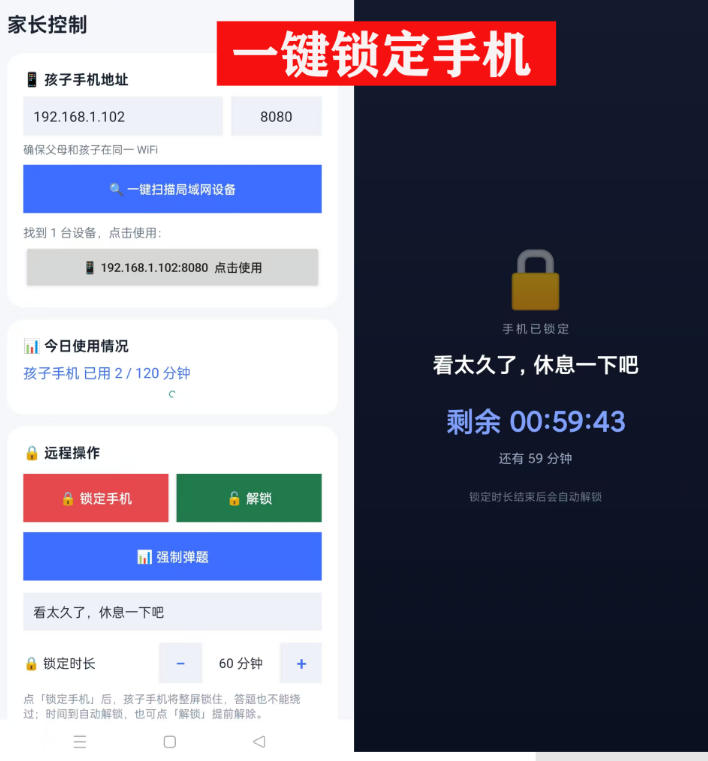
Phone anti-addiction tool: parents set a time limit; when time is up, the screen locks automatically and the child must answer questions correctly to continue playing. Supports remote phone locking
-
Game Gold-Farming Money-Making Plan: Earn 1k+ Daily, a Stable 3-Year Project Anyone Can Do in Spare Time [Revealed]
Study material — included with membership Get Membership -
Hot-game fully-automated earning: 500+ a day, no experience, simple operation - the steadiest long-term game-earning side hustle (revealed)
Study material — included with membership Get Membership -
FlyingMouse earns merit this time! Don't panic at Windows format problems — the open-source FlyingMouse format conversion tool helps, a popular GitHub gem
Study material — included with membership Get Membership -
Douyin Product-Selling Coaching Bootcamp: No On-Camera Appearance Needed, Newbies Can Produce Selling Short Videos by Following the Steps
Study material — included with membership Get Membership -
First-release game gold-farming money plan: 1K+ a day, ordinary people in spare time
Study material — included with membership Get Membership






-
FlyingMouse earns merit this time! Don't panic at Windows format problems — the open-source FlyingMouse format conversion tool helps, a popular GitHub gem
Study material — included with membership Get Membership -
LuDaShi v6.1024.4105.1121 Slim Single File
Study material — included with membership Get Membership -
2D Cartoon Animation Software Moho Pro v14.3
Study material — included with membership Get Membership -
Video Editor Aiseesoft Filmai v1.0.18
Study material — included with membership Get Membership -
To-Do Microsoft To Do v2.147 Free
Study material — included with membership Get Membership -
PR/AE/DaVinci/FCPX video Plugin Nobe OmniScope Win1.11.15 / Mac1.10.138
Study material — included with membership Get Membership






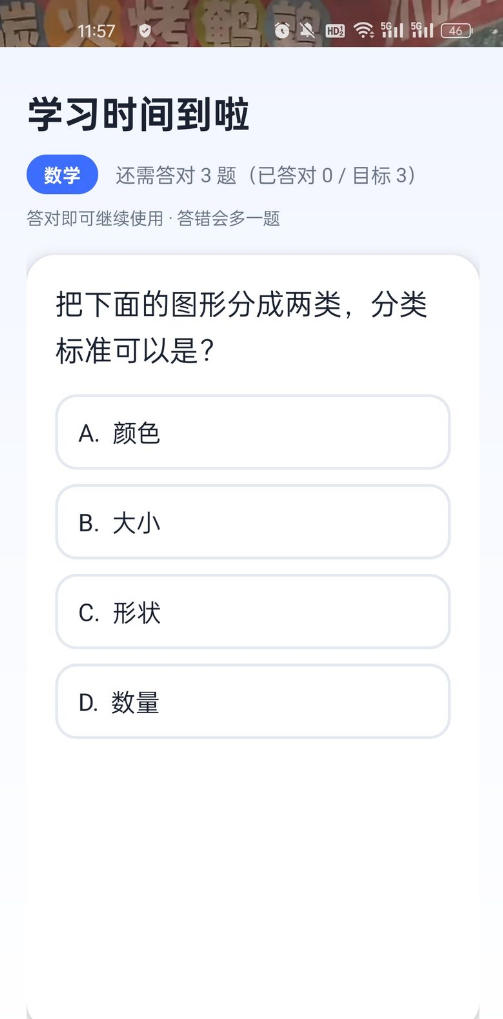
Kids won't let go of their phones and won't listen no matter how many times you tell them? This phone anti-addiction tool is designed to cure phone addiction: parents set the daily allowed usage time and the number of questions that must be answered correctly. When time is up, the phone automatically forces a lock screen, and the child must answer the specified number of questions correctly to unlock and continue playing; wrong answers add extra questions. In lock screen mode, all operations are invalid except powering off.
— Parent settings → auto lock screen → answer questions to unlock → wrong answers add questions —
Software Features
Parental time control: set your own daily allowed usage time; when time is up, the screen locks automatically with no need for manual supervision.
Answer questions to unlock: after the screen locks, answer the specified number of questions correctly to continue using the phone, combining play with review.
Wrong answers automatically add questions: each wrong answer adds another question; the worse the answers, the slower the unlock, effectively preventing addiction.
Strong lock screen blocking: during lock screen, switching to background, returning to home screen and other operations are all invalid; only answering questions or powering off can release it.
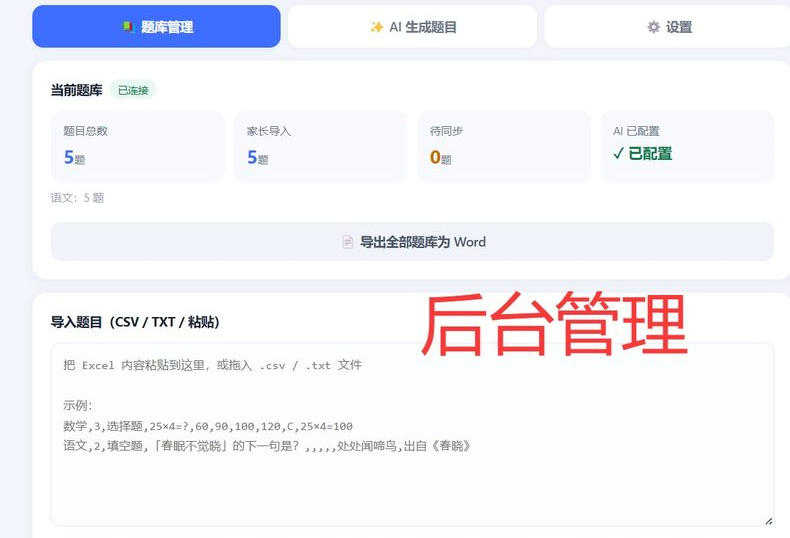
Batch question bank management: the web backend supports Excel paste, CSV/TXT import, statistics by subject, and one-click export to Word.
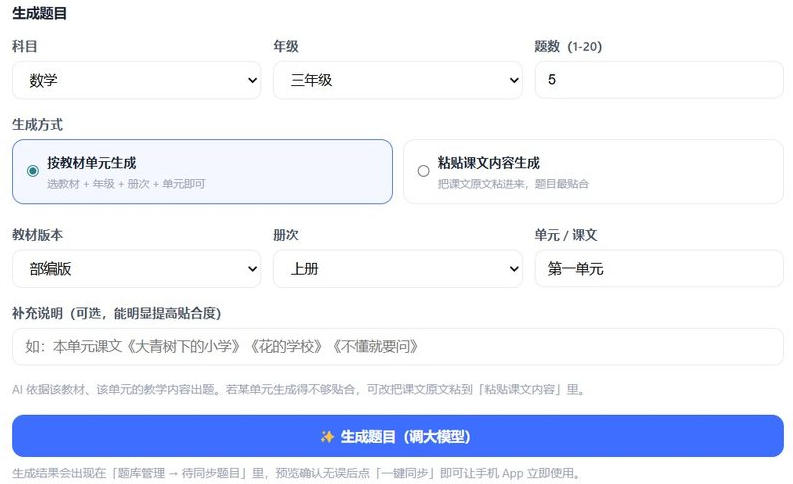
AI smart question generation: based on the electronic textbooks of the Smart Education of China platform, generate questions with one click by textbook version, grade, volume, and unit; you can also paste the original text of a lesson to generate questions.
Remote lock, remote unlock, remote forced answering
Software Screenshots

— Lock screen question interface: study time is up, answer correctly to continue —

— Backend question bank management: data statistics, batch import, export to Word —

— AI question generation: select a textbook unit, one-click call the large model to generate questions —
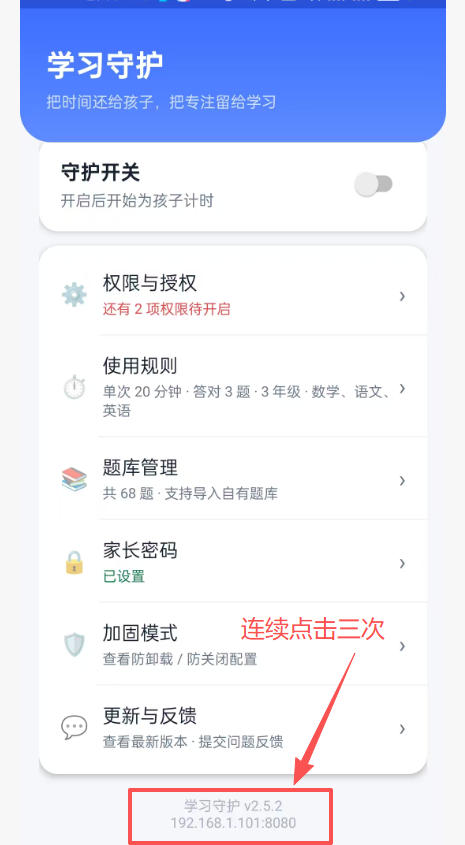
Tap the version number three times in a row at the bottom of the software to bring up the parental control system

The software has a remote control function; as long as both phones are on the same LAN, parents can lock their child's phone with one click from their own phone and force a fix

How to use the software
Step 1: Open parental settings, set the daily allowed usage time (e.g., 1 hour) and the number of questions that must be answered correctly (e.g., 3 questions).
Step 2: Turn on the Anti-Addiction switch, and control takes effect immediately.
Step 3: When the child's usage reaches the set time, the phone locks automatically; answering correctly allows continued use; wrong answers automatically add questions.
Step 4 (optional): Enter the web backend to import or AI-generate a question bank, preview and confirm, then sync to the phone App with one click.
Download address
Supporting Study Materials
This course comes with a materials pack. Members receive the access link by email after requesting the course.
Related Courses

Article Style 2: Large Top Image + Small Images
Article Style 3: Large Top Image
Article Style 4: Small Image-Focused Content
Article Style 5: Video List
Article Feature: Hidden Content
Software Primer: File Extensions, Version Naming and System Editions Explained
Juliang In-Feed Ads Placement Mindset + Practice: Quickly Master Core Skills!
Li's Premium Cold-Dish & Hot-Braised Series Tutorials — For Small-Business Startups and Anyone Learning Cold Dishes
Sept 2024 Upgraded Old-A Marketing Bootcamp: No Empty Talk, Hands-On Practice
Xiaohongshu Matrix Traffic Hands-On: Teach You to Quickly Capture Platform Traffic
